Java File I/O
File Processing
Declaring and Openning a File for Reading
| The java file below named fileUtils.java has a method named getScanner that will prompt the user for a file name, define a File variable and connect the File to a Scanner variable.This is a useful function to have available to other programs that need to process input files. Additional utilities can be added to the fileUtil to simplify future programming efforts.
In the sample main program that is shown, when the user runs the program they could have specified a file on the command line. If they did specify a file name on the command line then send the file name to getScanner to return a variable of type Scanner. If the user did not specify a file name on the command line, then getScanner is called to prompt the user for a file name, and then return a Scanner variable that has been associated with the file.
|
|
// Source code: fileUtils.java
import java.io.File;
import java.util.Scanner;
public class fileUtils {
public Scanner getScanner(String fn) {
File file;
Scanner sc;
Scanner ret=null; // return value
String fnin="";
boolean gotFile = true;
// if there was a file name passed in, try to open in for reading
fnin = fn;
do {
if ((fnin.length() <= 0)) {
sc = new Scanner(System.in);
System.out.print("Enter a file name: ");
fnin = sc.nextLine();
}
//else
// System.out.println("process file " + fnin + " file name length = "+ fnin.length());
try {
gotFile = false;
file = new File(fnin);
ret = new Scanner(file);
gotFile = true;
} catch (Exception ex) {
System.out.println("Unable to open input file " + fnin);
fnin=""; // force next read
}
} while (!gotFile);
return ret;
}
public static void main(String[] args) {
fileUtils a = new fileUtils();
Scanner sc = null;
if (args.length > 0) {
System.out.println("arglen = " + args.length + " " + args[0]);
sc = a.getScanner(args[0]);
}
else
sc = a.getScanner("");
sc.close(); // nothing was done to the file.
} // main
} // fileUtils
|
|
getScanner was called from the main progam. The program was run without specifying command line arguments. The first file name the user specified was invalid, the second file name was valid/
Here is a sample program run :
|
Input File Processing
| Assignment: Write a program to analyze a writing sample that will count the number of letters in each word and generate a report that shows the frequency of each word-length. This means that word counts need to be kept for each word length along with the total number of words in a writing sample so that the frequency percent can be calculated.
The program below
|
|
import java.io.File;
import java.util.Scanner;
// 12345. has a length 6 Should all punctuation be removed? Maybe just .?!() and "
// What is the word length of her's 3, 4, or 5?
// maybe not print stats for lengths that have no words
public class CountWords {
private static int[] wordCount = new int[15];
private static int total_words = 0;
public CountWords() {
for (int i = 0; i < wordCount.length; i++)
wordCount[i] = 0;
total_words = 0;
}
public String toString() {
String ret = "";
for (int i = 1; i < wordCount.length; i++)
ret = ret + String.format("Proportion of %d-letter words is %2.1f%% (%d words)\n",i,
(wordCount[i]*1.0/total_words)*100, wordCount[i]);
ret = ret + String.format("Proportion of %d-letter(or more) words is %2.1f%% (%d words)\n",
wordCount.length,
(wordCount[0]*1.0/total_words)*100, wordCount[0]);
return ret;
}
public static void addWord(String word) {
if (word.length() < 1) // skip it
return;
else if (word.length() >= wordCount.length) // too big
wordCount[0]++;
else // worth counting
wordCount[word.length()]= wordCount[word.length()]+1;
total_words++;
}
public static void processFile (Scanner input) {
while (input.hasNextLine())
{
String line = input.nextLine();
// split the line into an array of words
String[] arr = line.split(" "); // translate punct into spaces first?
// loop thru the array -
// look at the length of each word
// count how many words of that length we have seen
for ( String ss : arr) {
//System.out.println("Process " + ss + " length = " + ss.length());
addWord(ss);
}
} // while
}
public static void main(String[] args) {
fileUtils a = new fileUtils(); // use getScanner
CountWords c = new CountWords();
Scanner sc = null;
if (args.length > 0)
sc = a.getScanner(args[0]);
else
sc = a.getScanner("");
c.processFile(sc);
System.out.println(c.toString());
sc.close();
} // main
} // fileUtils
|
|
getInteger was called from the main progam in testi.java
Here is a sample program run :
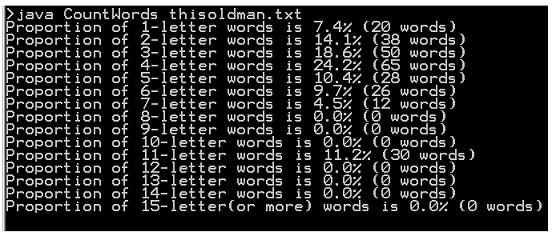
The program was run with the input file thisoldman.txt which was specified on the command line.
|
|
Input File Processing
Reading and Processing Scanner File Input
Assignment: Write a program to read a file whose data is a series of pairs of
tokens, where each pair begins with an integer value and is followed by the type of coin,
which will be pennies (1 cent each), nickels (5 cents each), dimes (10 cents each),
or quarters (25 cents each), case-insensitively. Your program should add up the cash
value of all the coins and then output the total amount of money. For example, if the
input file contains the text:
3 pennies 2 quarters 1 Pennies 23 NiCKeLs 4 DIMES
your program would output Total money = $2.09
Note: input file will have pairs of tokens, but there could be dupilicate coins specified (like pennies above), and some lines will not have each of the possible types of coins.
|
|
public class CountCoins {
public static boolean trace = false;
public static void processFile (Scanner input) {
int coins = 0;
String coin_type = "";
double total = 0.0;
while (input.hasNextLine()) {
String line = input.nextLine();
// split the line into an array of words parsing and whitespace
String[] arr = line.split("\\s");
if (trace)
for (int j=0; j< arr.length; j++)
System.out.println("Trace token["+j+"] = " + arr[j]);
total = 0.0;
int i = 0;
while(i < arr.length) {
coins = Integer.parseInt(arr[i]);
i++;
if (i < arr.length) { // get coint type
coin_type = arr[i].toLowerCase();
if (coin_type.equals("pennies"))
total = total + 0.01*coins;
else if (coin_type.equals("nickels"))
total = total + 0.05*coins;
else if (coin_type.equals("quarters"))
total = total + 0.25*coins;
else if (coin_type.equals("dimes"))
total = total + 0.10*coins;
else
System.out.println("Unknown coin type ignored: "+coin_type);
i++;
if (trace)
System.out.printf(" subTotal Money = $%1.2f \n",total);
} // processing the line of input
} // expecting 10 entries, of 5 pairs of # coin-type - process in pairs
System.out.printf("Total Money = $%1.2f \n",total);
} // while
}
public static void main(String[] args) {
fileUtils a = new fileUtils();
CountCoins b = new CountCoins();
Scanner sc = null;
if (args.length > 0) {
if (b.trace)
System.out.println("arglen = " + args.length + " " + args[0]);
sc = a.getScanner(args[0]);
}
else
sc = a.getScanner("");
b.processFile(sc);
sc.close();
} // main
} // CountCoins
|
|
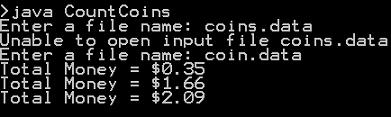
processFile was called from the main program. The main program begins by seeing if a file name was specified on the command line, if so, that file name is used to process a file, otherwise the user is prompted to specify the name of a file to process. The program was run with the file
coin.data which contains:
	5	pennies	3 dimes
	2 pennies 2 nickels 2 quarters 2 pennies 9 dimes 12 pennies
	3 pennies 2 quarters 1 Pennies 23 NiCKeLs 4 DIMES
Here is a sample program run :
|
|