Source code: Term1.php

IB CS Trimester I


Contact Information:Mr. Brennan
E-mail:J.Brennan@HWMath.net
Cell:(617) 872-2932
Skype ID:hwmath.jim

Trimester I Introduction to Computer Science

Unit 1 Introduction to Programming and Personal Computing

Topics: Basic programming; programming the TI 84 graphing calculator; Inside the computer, hardware, software.

Agendas

DateTopics/Activities
Tuesday
October 27
    Starter
  • Announcements:
    • Quiz 1 : BASIC commands - returned, discuss grading
    • Use of google drive to turn in files
    • Office Hours: Tuesday before school and Thursday in student lounge or library at 1:00.
    • This will be the last day using class time for Labs 1-5. Additional time can be arranged.
    • other questions?
  • Quiz : Commands from the command prompt
    Main Activity
  • Turn in all files to the google drive
  • Complete BASIC Labs 1 through 5
  • Optional Labs 6 and 7 for students who have turned in all other Labs
    Summary:
  • The following program creates an array of 100 random numbers between 0 and 1000.
    100 DIM R(100)
    200 for i =1 to 100
    220      R(i) = (RND(1)*1000) mod 1000
    240      REM print "R("i") = ", R(i)
    260      next i

      Can you modify the program to find (and print out) the following:
    • The lowest number generated
    • The highes number generated
    • The list of numbers in ascending order (lowest to highest)
    • The list of numbers in descending order (highest to lowest)
    • The average of all of the numbers
Fall
Vacation
    Optional Extension Activities
  • Lab 6
    • Open the directions for Lab-6 and follow all of the directions.

  • Lab 7
      Open the directions for Lab-7 and follow all of the directions.
      Deliverable: Submit any programs you create, for extra credit, by copying them to the google drive by the end of the day Monday October 26

Friday
October 16
    Starter
  • Quick review of the resources available on this web site, the list of activities we've done in class, some notes on the activities, and the list of concepts separated by topic.
  • Quick list of optional labs (Lab 6 and Lab 7) that students can try out over the break.

    Main Activity
  • Submit a copy of your file: LearningBasic.doc onto the google drive for grading. (Due today)

  • Lab 5 While Loops and File Processing
      Lab 5 Part I
    • Open the directions for Lab-5 Part I and follow all of the directions.
      File: echo.bas
      Deliverable: e-mail copyme.bas and copyme.out to JBrennan@isbos.org

      Lab 5 Part II
    • Open the directions for Lab-5 Part II and follow all of the directions.
      File: testcopy.dat
      Deliverable: e-mail copyfile.bas to JBrennan@isbos.org

      Lab 5 Part III
    • Open the directions for Lab-5 Part III and follow all of the directions.
      Deliverable: findstr.bas
    Summary:
  • File processing notes
    The lab uses #1 for the input channel and #2 for the output channel. You will get an error trying to read from the output channel or write to the input channel. Review the PRINT and LINE INPUT statements to make sure that they are using the correct channel - when they are using channels.
    Homework:
  • See optional Labs 6 and 7
Thursday
October 15
    Starter
  • Share your ideas about Google Classroom and the School Portal
    Main Activity
  • Be sure to copy to the google drive each of the files for Lab 4:
    • Part I: ForLoop.bas
    • Part II: DaysAway.bas
    • Part III: Primes.bas
  • Submit a copy of your file: LearningBasic.doc onto the google drive for grading. (Due Friday)

  • Lab 5 While Loops and File Processing
      Lab 5 Part I
    • Open the directions for Lab-5 Part I and follow all of the directions.
      File: echo.bas
      Deliverable: e-mail copyme.bas and copyme.out to JBrennan@isbos.org

      Lab 5 Part II
    • Open the directions for Lab-5 Part II and follow all of the directions.
      File: testcopy.dat
      Deliverable: e-mail copyfile.bas to JBrennan@isbos.org

      Lab 5 Part III
    • Open the directions for Lab-5 Part III and follow all of the directions.
      Deliverable: findstr.bas
    Summary:
  • File processing notes
    Homework:
  • Download the Operating System Note file OS-Commands.doc. This is a MS Word file that contains a list of basic skills that you are using to navigate in the Command Prompt Window. These skills will be applicable to other operating systems. Fill out this "How To" form with notes/directions and examples from your labs. Keep this document electronically.
Tuesday
October 13
    Starter
  • Quiz: BASIC command
    Main Activity
  • Complete All Part of Lab 4: and e-mail all required programs

  • Lab 5 While Loops and File Processing
      Lab 5 Part I
    • Open the directions for Lab-5 Part I and follow all of the directions.
      File: echo.bas
      Deliverable: e-mail copyme.bas and copyme.out to JBrennan@isbos.org

      Lab 5 Part II
    • Open the directions for Lab-5 Part II and follow all of the directions.
      File: testcopy.dat
      Deliverable: e-mail copyfile.bas to JBrennan@isbos.org

      Lab 5 Part III
    • Open the directions for Lab-5 Part III and follow all of the directions.
      Deliverable: findstr.bas
    Summary:
  • File processing notes
Friday
October 9

Thursday
October 8

    Starter Friday: Openning a Command Prompt Window
  • Operating System Topics
    • Special file names and file types
    • Mapping directories
    • Redirecting input
    • Redirecting Ouput
    • piping
    • For reference Quad1v3.bas
    • Batch Files
    Main Activity
  • Complete Lab 4 Part I The FOR statement and PRINT USING
    File: Trace-2.basThis was updated on Tuesday afternoon so the line numbers match the lab instructions.
    When you are finished. e-mail your program ForLoop.bas to JBrennan@isbos.org

  • Complete Lab 4 Part II Using Arrays
    File: DaysAway.bas
    When you are finished. e-mail your program DaysAway.bas to JBrennan@isbos.org

  • Complete Lab 4 Part III Using Arrays and FOR Loops
    File: Trace-3.bas
    When you are finished. e-mail your program Primes.bas to JBrennan@isbos.org

  • Download the BASIC Programming Note file LearningBasic.doc. This is a MS Word file that contains a list of basic skills that you are learning about programming in general, and BASIC programming specifically. Fill out this "How To" form with notes/directions and examples from your BASIC program. Keep this document electronically - it allows you to copy-cut-paste program code.

    These programming skills are the basic skills needed for learning (almost) any programming language. Learning these skills is a recipe for how to learn additional programming languages. You will submit this next Friday for a grade.

    Summary:
  • Summary of Programming Terms
  • Summary of operating systems commands
  • Creating a Batch File
  • If you are not able to log into the network because your userid has expired, be sure to contact the IT department.
Tuesday
October 6
    Starter
  • Trace the purpose of the variables in program Trace-3.bas.
    Complete the Trace-3 Variables handout.
  • Homework check - completing the QUAD1 program on the TI84
    Main Activity
  • What are variables really?
  • Presentation: Variable Types and type conversion
  • Presentation: Introduction to Arrays - Using Arrays (of numbers, of strings)
  • Presentation: Tracing a Program with a loop: TraceProgram-Trace-2.pdf
  • Introduction to the FOR Statement

  • Lab 4 Part I The FOR statement and PRINT USING
    Trace-2.basThis was updated on Tuesday afternoon so the line numbers match the lab instructions.

    Summary:
  • Basic Command Summary and where we go from here.
Friday
October 2
    Starter: Integer Arithmetic
    Agenda
    Summary:
  • What is a program?
  • What does it mean to trace a program?
    Homework: Due Tuesday
    Complete the QUAD1 program on the TI-84 calculator to find the roots of a quadratic equation. The QUAD1 program for the graphing calculator can be completed incrementally - step by steps instructions can be found below in the Content Covered section.
      Program requirements:
    1. Prompt the user for a,b,c
    2. Echo the values back to the user
    3. Have error checking
      if A = 0 then
            send the user an error message
          stop the program
    4. Calculate the value of D = B2-4AC
    5. If D < 0 then
            tell the user there are no real solutions
           stop the program
    6. if D = 0
           tell the user why there will be only one real solution
    7. calculate E, F (as needed) display values E,F (as needed)
  • On Tuesday we will write a second program that will loop and call QUAD1 until the user indicates that they don't want to run it any more.

Thursday
October 1
    Starter: Summary of Commands issued on the Command Line
    Main Activity - Lab 3: Conditional Programming in BASIC
  • Open Lab-3.pdf.
  • Follow the directions (or follow allong with the front of the room)
  • File QuadLab3.bas
    Summary:
  • New commands for OS
  • New BASIC commands and program structures
  • Programming Assignments
  • Office Hours
Tuesday
September 29
    Starter: Identify Components of Windows Explorer
    Summary: What is a program?
  • Where does input come from?
  • Where does output go?
  • Today we saw how to deal with several unexpected events:
    • The network was not available when everyone was trying to log in, so we were not able to start right off using the laptops. Not a big deal, we talked about the elements found on a Windows Explorer screen shot and talked about drives and directories.
    • The gwbasic program would not run on the laptops (or the classroom desktop) because it was not compiled to run an a 64-bit computer. We'll talk more about that in the weeks ahead. It took a little time to adjust to the blassic BASIC interpreter and the lab directions were not set up for the blassic interpreter.
    • The lab will be redesigned knowing that :
      • The laptops have access to a command prompt which will be very benefitial to our discussions about operating systems.
      • The blassic BASIC interpreter does work and all of the objectives for using BASIC will be met using it instead of gwbasic.
Friday
September 25
    Starters:
  • Course introduction
  • Summary of what we did yesterday
  • Specifics Bob How old is a person...
    Main Activities
  • Continue with QUAD1 program for the graphing calculator
    See versions below.
      References:
    • Notes from yesterday, quadratic equation, and some calculator screen shots.
    • Command Reference for Programming the TI84/85

        Command Notes
      • The Input command can prompt the user for one variable, such as
        Input A
        but it will only prompt the user with a ?
        so often the Input command will be used with a string that will act as a prompt:
        Input "Enter A:",A
      • The Prompt command can prompt the user for one variable or more , variables, but will prompt the user for them one at a time
        Prompt A, B, C
      • The Disp command Dispplays output to the user. A text string will be left justified on the screen and numbers will be right justified.

        Test Data
      • x2 + 3x - 4 = 0
        A = 1, B = 3, C = -4
        Solutions: x = -4, x = 1
      • 2x2 - 4x - 3 = 0
        A = 2, B = -4, C = -3
        Solutions: x = -0.58113883, x = 2.5811388
      • What happens when A=1, B=1, C=5 ?
      • What happens when A=0, B=3, C=2 ?
Thursday
September 24
    Starter: Posted questions
    Main Activity
  • Defining the steps
  • Phenomenon
  • Using variables / TI84
  • Programming TI84
    Summary: What is a program?

Content Covered
TI 84 Assignments

These programs should be working in you calculator by the end of the day on Tuesday October 6.

    Programming the TI83/TI84
  • The QUAD1 program for the graphing calculator can be completed incrementally - add some functionality and complete testing for each version.
  • Versions:
    1. prompt the user for a,b,c
      echo the values back to the user
      Step-by-Step Directions Lab 1: QUAD1 Version 1
    2. prompt the user for a,b,c
      echo the values back to the user
      calculate d, e, f
      display values e,f
      Step-by-Step Directions Lab 1: QUAD1 Version 2
    3. add error checking
      if A = 0 then
            send the user an error message
          stop the program
      Step-by-Step Directions Lab 1: QUAD1 Version 3
    4. If D < 0 then
            tell the user there are no real solutions
           stop the program
    5. if D = 0
           tell the user why there will be only one real solution
    6. write a second program that will loop and call QUAD1 until the user indicates that they don't want to run it any more.

Summary and Reminders
    Summary
  • A Textbook will not be required. Reading assignments will use online resources and handouts as needed.
  • The Key Concepts section below will be updated as we cover topics. These are the terms that you should know; The terms in the objectives section are topics you will know.

    Reminders
  • Supplies: A calculator and iPad everyday will be helpful
  • For the time being, we will use the school's laptops for all computer programming activities.
  • Homework
  • Quiz:
  • Office Hours:Still need to be determined
Unit-1 Student Handouts/Resources
 

Introduction to Computer Science: Objectives


Topic 1: System fundamentals

Objectives:

1.1 Systems in Organizations

Planning and system installation
1.1.7Suggest various types of testing.
User Focus
1.1.8Describe the importance of user documentation.
1.1.9Evaluate different methods of providing user documentation.
1.1.10Evaluate different methods of delivering user training.
Software Deployment
1.1.14Describe strategies for managing releases and updates.

1.2 System Design Basics

Components of a Computer System
1.2.1Define the terms: hardware, software, peripheral, network, human resources.

Topic 2: Computer organization

Objectives:

2.1 Computer Organization

2.1.7Outline the use of a range of application software.

Topic 4: Computational thinking, problem-solving and programming

Objectives:

4.1 General Principles

Thinking Procedureally
4.1.1Identify the procedure appropriate to solving a problem.
4.1.2Evaluate whether the order in which activities are undertaken will result in the required outcome.
Thinking Logically
4.1.4Identify when decision-making is required in a specified situation.
Thinking Ahead
4.1.9Identify the inputs and outputs required in a solution.
4.1.13Identify exceptions that need to be considered in a specified problem solution.

4.2 Connecting Computational Thinking and Program Design

4.2.4Analyse an algorithm presented as a flow chart.
4.2.5Analyse an algorithm presented as pseudocode.
4.2.6Construct pseudocode to represent an algorithm.

4.3 Introduction to Programming

Nature of Programming Languages
4.3.1State the fundamental operations of a computer.
4.3.2Distinguish between fundamental and compound operations of a computer.
4.3.3Explain the essential features of a computer language.
4.3.4Explain the need for higher level languages.
4.3.5Outline the need for a translation process from a higher level language to machine executable code.
Use of Programming Languages
4.3.6Define the terms: variable, constant, operator, object.
4.3.7Define the operators =, ., <, <=, >, >=, mod, div.
4.3.8Analyse the use of variables, constants and operators in algorithms.
4.3.9Construct algorithms using loops, branching.


Unit 2 How Computers Operate

Topics: Low-level programming; Inside the CPU; Number systems and Logic.

Agendas: Unit-2

Friday
December 4
Thursday
December 3
    Main Activity
  • Trimester I Exam - Session I
  • Trimester I Exam - Session II
Tuesday
December 1
    Starter:
  • Collect homework due today - counting words in a file
  • Review resources that are available on the website to prepare for the test
    Homework:
  • Complete webquest
  • Have another student check your answers
  • This will not be graded as a homework assignment; the quality effort put into the assignment will be reflected in your test score
  • Be prepared for the Trimester I test Thursday December 3.
Tuesday
November 24
    Starter: Batch Files
  • Problem posted on the board for practice and review of operating systems command line interface.
  • Collect the homework due today - the practice review packet for the test on Thursday December 3
    Main Activity:
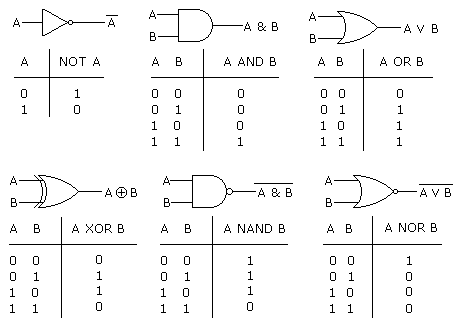
  • Demonstration: digital electronics NAND gates
  • Finish Operating Sysystems and Computer Internals presentation
  • Review homework answers
    Homework: Flow Charts and Pseudocode

      Make a flow chart and write pseudo code that completes the following program requirements:
    • Read a text file and displays the total number of lines in the file and a count of how many times a word occurs.
    • The output of the program should be a list of words in alphabetical order and the word count.

      Check your homework that was due today
    1. There are two files, both contains names that have been sorted ascending (in alphabetical order)
      a. Create a block diagram (flow chart) of a process that will read both files to create a single output file containing a merged list of names from both files. Review the Lab instructions examples of a flow chart.
      b. Write pseudo-code that implements the diagram from part A.
        Solution:We reviewed this answer in class today MergeFiles.pdf
        We discussed flow chart symbols, the flow chart with an algorithm for merging sorted files, and pseudocode for merging two sorted files. We also did a hands-on merge activity using cards with the same example data.

    2. Complete the handout containing Boolean algebra practice problems.

    3. Practice number systems conversion using the link posted on the Agenda for Tuesday November 3, which can also be found at : http://hwmath.net/IBCS/T1/I2PC/NumberQuiz.html
        Solution: Your score on the test Thursday December 3 will reflect your review effort

    4. Complete the handout with the sensor problem

    5. Review the instructions for all of the posted Lab activities - you will see they contains a review of BASIC command, Command Prompt Commands, and information that can be used in place of a textbook.
        Solution: Practice and review of batch file commands done as a class Starter activity

    6. If you have missing Lab files, upload them your subdirectory on the class Google drive. You should also upload the notes file for basic commands and commands for the command prompt if you have not already done so - make sure you complete those handouts. Everyone has access to a command prompt - make sure that you understand all of the commands.
        Solution: Each student should upload missing files

    7. The links on the left side of the web site HWMath.net/IBCS contain summary information for activities that we have done in class and for homework. You may find these links easier to navigate than the daily agendas. You will be responsible for knowing all information posted under Introduction to Programming, Introduction to Operating Systems, and How Computers Operate. Check back to these sections as they will be updated regularly between now and December 3.
        Solution: Your score on the test Thursday December 3 will reflect your review effort

Friday
November 20
    Summary:
  • Homework - handout
  • What will be on the test on Thursday December 3 ? (handout)
  • Do I have any missing work? (handout)
Thursday
November 19
    Starter: Exclusive Or/Algebraic Expressions
Tuesday
November 17
    Main Activity
  • Handout: BooleanAlgebra2.pdf: Truth tables, Boolean Algebra, Laws and Properties
  • Handout: Writing Boolean Algebraic expressiont to represent Logic Circuits
DateTopics/Activities
Friday
November 13
    Main Activity
      (bitwise) Boolean Operations
    • AND
    • OR
    • NOT
    • XOR
    • NOR
    • NAND
    • Shift Left
    • Shift Right
    • The difference between bitwise operators and logic operators
    • Logic Gates and Truth Tables
    • FL Logic Gate Demo
      Homework
    • Complete the P88 program that will prompt the user for up to 10 positive numbers, and stores them in memory locations that you may determine (was 40 to 49, but that may not be the best place). The user may enter a value less or equal to 0 to signal your program that they are finished entering numbers. Your program should then sort the list of numbers from high to low and then send them to the output in decending order. Upload a file name sort10.as into your google drive folder on the class web site for grading. DUE: Tuesday before class
Thursday
November 12
    Starter: Return Quizzes: Review Number System Conversion
    Main Activity
      Decoding P88 Programs
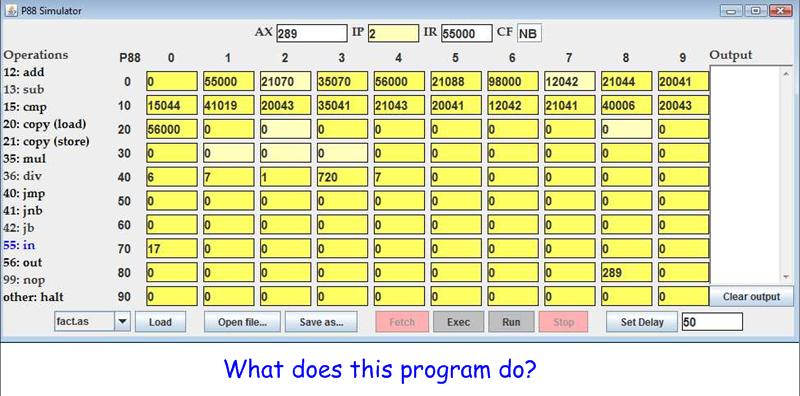
    • Part 1: Handout: Decode P88 program DecodeProblem2.as (hand it in)
    • Part 2: download file DecodeProblem2.as . Set the IR to 80 and run the program. Does the program produce what you thought it would do? What is interesting about this program?
      You can download the P88 Simulator here if you need it: P88 Computer (Java jar file)

      Homework
    • Complete the P88 program that will prompt the user for up to 10 positive numbers, and stores them in memory locations that you may determine (was 40 to 49, but that may not be the best place). The user may enter a value less or equal to 0 to signal your program that they are finished entering numbers. Your program should then sort the list of numbers from high to low and then send them to the output in decending order.
Tuesday
November 10
    Starter: Quiz: Number System Conversion
    Main Activity
  • Part 1: Handout: Decode P88 program CWdecode01.as (hand it in)
  • Part 2: download file CWdecode01.as . Set the IR to 0 and run the program. Does the program produce what you said it would for when you enter the value of 5? What about the value of 1? What happens if you enter a negative number - does the program still do what you said it does?
    You can download the P88 Simulator here if you need it: P88 Computer (Java jar file)
  • Part 3: Change the CWdecode01.as program so that it prompts the user for two numbers: a high number and a low number. Have the program output numbers counting down from the high number and stopping after it prints the low number. Save the program as High2Low.as. Be sure to upload the High2Low.as file to your shared google drive directory.

    Homework
  • Write a P88 program that will prompt the user for up to 10 positive numbers, and stores them in memory locations 40 to 49. The user may enter a value less or equal to 0 to signal your program that they are finished entering numbers. Your program should then sort the list of numbers from high to low and then send them to the output in decending order.
Friday
November 6
    Starter: Turn in homework
    Main Activity
  • Low level program execution
  • ...Download The P88 Computer (Java jar file)
    Right-click on the link, select Save Link As, and store this in a location you can find, such as a downloads directory.
  • ...Open the directory where you stored P88.jar and start the program
  • ...Open the lab manual P88-Lab-1.pdf and be sure to read each page, and follow the directions.
  • A handout for programming the P88 will be provided, but is also available online P99Notes.pdf
    Summary:
  • For homework, download the P88.jar file and complete one of the following program assignments. Submit pseudo-code, the assembly language code, and the machine code file .as file. Don't skip steps by trying to code in machine code before writing out what you are trying to do.
      Programming Choices:
    • Write a program that will ouput the numbers from 1 to 10.
    • Write a program that will prompt the user for a number, and then output a list of numbers from 1 to the number specified by the user.
    • Write a program that will prompt the user for a starting number, and an ending number, then output the sum of all of the numbers from the starting number to the ending number.
    • Write a program that prompts the user for 10 numbers, and store them in memory locations 40 to 49.
Thursday
November 5
    Starter: Number Systems
  • ...Notes: Representing numbers in base 2, 8, 10, and 16
  • ...Practice: Converting numbers from one base to another
    Main Activity
  • How computers represent numbers (and variables) internally
  • Simple execution of program statements
  • Representing program statements - high level, low level, machine code
  • Low level program execution
  • ...The P88 Computer (Java jar file)
  • ...P88 Documentation (Harvard)
Tuesday
November 3
    Starter: The internals of a Personal Computer
    Main Activity
  • Adding to the book of lists
  • Introduction to Number Systems
  • ...Number Quiz
    Summary:
  • Number Systems - homework, converting between bases
  • Guess the Color
Friday
October 27
    Summary:
  • A starting point on common vocabulary

Unit 1: Introduction to Programming and Personal Computing


Topic 1: System fundamentals

Objectives:

1.1 Systems in Organizations

Planning and system installation
1.1.1Identify the context for which a new system is planned.
1.1.2Describe the need for change management.
1.1.3Outline compatibility issues resulting from situations including legacy systems or business mergers.
1.1.4Compare the implementation of systems using a client’s hardware with hosting systems remotely.
1.1.5Evaluate alternative installation processes.
1.1.6Discuss problems that may arise as a part of data migration.
1.1.7Suggest various types of testing.
User Focus
1.1.8Describe the importance of user documentation.
1.1.9Evaluate different methods of providing user documentation.
1.1.10Evaluate different methods of delivering user training.
System Backup
1.1.11Identify a range of causes of data loss.
1.1.12Outline the consequences of data loss in a specified situation.
1.1.13Describe a range of methods that can be used to prevent data loss.
Software Deployment
1.1.14Describe strategies for managing releases and updates.

1.2 System Design Basics

Components of a Computer System
1.2.1Define the terms: hardware, software, peripheral, network, human resources.
1.2.2Describe the roles that a computer can take in a networked world.
1.2.3Discuss the social and ethical issues associated with a networked world.
System Design and Analysis
1.2.4Identify the relevant stakeholders when planning a new system.
1.2.5Describe methods of obtaining requirements from stakeholders.
1.2.6Describe appropriate techniques for gathering the information needed to arrive at a workable solution.
1.2.7Construct suitable representations to illustrate system requirements.
1.2.8Describe the purpose of prototypes to demonstrate the proposed system to the client.
1.2.9Discuss the importance of iteration during the design process.
1.2.10Explain the possible consequences of failing to involve the end-user in the design process.
1.2.11Discuss the social and ethical issues associated with the introduction of new IT systems.
Human Interaction with the System
1.2.12Define the term usability.
1.2.13Identify a range of usability problems with commonly used digital devices.
1.2.14Identify methods that can be used to improve the accessibility of systems.
1.2.15Identify a range of usability problems that can occur in a system.
1.2.16Discuss the moral, ethical, social, economic and environmental implications of the interaction between humans and machines.

Topic 2: Computer organization

Objectives:

2.1 Computer Organization

Computer Architecture
2.1.1Outline the architecture of the central processing unit (CPU) and the functions of the arithmetic logic unit (ALU) and the control unit (CU) and the registers within the CPU.
2.1.2Describe primary memory.
2.1.3Explain the use of cache memory.
2.1.4Explain the machine instruction cycle.
Secondary Memory
2.1.5Identify the need for persistent storage.
Operating Systems and Application Systems
2.1.6Describe the main functions of an operating system.
2.1.7Outline the use of a range of application software.
2.1.8Identify common features of applications.
Binary Representation
2.1.9Define the terms: bit, byte, binary, denary/decimal, hexadecimal
2.1.10Outline the way in which data is represented in the computer.
Simple Logic Gates
2.1.1111 Define the Boolean operators: AND, OR, NOT, NAND, NOR and XOR.
2.1.12Construct truth tables using the above operators.
2.1.13Construct a logic diagram using AND, OR, NOT, NAND, NOR and XOR gates

Topic 3: Networks

Objectives:

3.1 Networks

Network Fundamentals
3.1.1Identify different types of networks.
3.1.2Outline the importance of standards in the construction of networks.
3.1.3Describe how communication over networks is broken down into different layers.
3.1.4Identify the technologies required to provide a VPN.
3.1.5Evaluate the use of a VPN.
Data Transmission
3.1.6Define the terms: protocol, data packet.
3.1.7Explain why protocols are necessary.
3.1.8Explain why the speed of data transmission across a network can vary.
3.1.9Explain why compression of data is often necessary when transmitting across a network.
3.1.10Outline the characteristics of different transmission media.
3.1.11Explain how data is transmitted by packet switching.
Wireless Networking
3.1.12Outline the advantages and disadvantages of wireless networks.
3.1.13Describe the hardware and software components of a wireless network
3.1.14Describe the characteristics of wireless networks.
3.1.15Describe the different methods of network security.
3.1.16Evaluate the advantages and disadvantages of each method of network security.

Topic 4: Computational thinking, problem-solving and programming

Objectives:

4.1 General Principles

Thinking Procedureally
4.1.1Identify the procedure appropriate to solving a problem.
4.1.2Evaluate whether the order in which activities are undertaken will result in the required outcome.
4.1.3Explain the role of sub-procedures in solving a problem.
Thinking Logically
4.1.4Identify when decision-making is required in a specified situation.
4.1.5Identify the decisions required for the solution to a specified problem.
4.1.6Identify the condition associated with a given decision in a specified problem.
4.1.7Explain the relationship between the decisions and conditions of a system.
4.1.8Deduce logical rules for real-world situations.
Thinking Ahead
4.1.9Identify the inputs and outputs required in a solution.
4.1.10Identify pre-planning in a suggested problem and solution.
4.1.11Explain the need for pre-conditions when executing an algorithm.
4.1.12Outline the pre- and post-conditions to a specified problem.
4.1.13Identify exceptions that need to be considered in a specified problem solution.
Thinking Concurrently
4.1.14Identify the parts of a solution that could be implemented concurrently.
4.1.15Describe how concurrent processing can be used to solve a problem.
4.1.16Evaluate the decision to use concurrent processing in solving a problem.
Thinking Abstractly
4.1.17Identify examples of abstraction.
4.1.18Explain why abstraction is required in the derivation of computational solutions for a specified situation.
4.1.19Construct an abstraction from a specified situation.
4.1.20Distinguish between a real-world entity and its abstraction.

4.2 Connecting Computational Thinking and Program Design

4.2.1Describe the characteristics of standard algorithms on linear arrays.
4.2.2Outline the standard operations of collections.
4.2.3Discuss an algorithm to solve a specific problem.
4.2.4Analyse an algorithm presented as a flow chart.
4.2.5Analyse an algorithm presented as pseudocode.
4.2.6Construct pseudocode to represent an algorithm.
4.2.7Suggest suitable algorithms to solve a specific problem.
4.2.8Deduce the efficiency of an algorithm in the context of its use.
4.2.9Determine the number of times a step in an algorithm will be performed for given input data.

4.3 Introduction to Programming

Nature of Programming Languages
4.3.1State the fundamental operations of a computer.
4.3.2Distinguish between fundamental and compound operations of a computer.
4.3.3Explain the essential features of a computer language.
4.3.4Explain the need for higher level languages.
4.3.5Outline the need for a translation process from a higher level language to machine executable code.
Use of Programming Languages
4.3.6Define the terms: variable, constant, operator, object.
4.3.7Define the operators =, ., <, <=, >, >=, mod, div.
4.3.8Analyse the use of variables, constants and operators in algorithms.
4.3.9Construct algorithms using loops, branching.
4.3.10Describe the characteristics and applications of a collection.
4.3.11Construct algorithms using the access methods of a collection.
4.3.12Discuss the need for sub-programmes and collections within programmed solutions.
4.3.13Construct algorithms using predefined sub-programmes, one-dimensional arrays and/or collections.

Topic 5: Abstract data structures

Objectives:

5.1 Abstract Data Structures

Thinking Recursively
5.1.1Identify a situation that requires the use of recursive thinking.
5.1.2Identify recursive thinking in a specified problem solution.
5.1.3Trace a recursive algorithm to express a solution to a problem.
Abstract Data Structures
5.1.4Describe the characteristics of a two-dimensional array.
5.1.5Describe the characteristics and applications of a stack.
5.1.6Describe the characteristics and applications of a stack.
5.1.7Construct algorithms using the access methods of a stack.
5.1.8Describe the characteristics and applications of a queue.
5.1.9Construct algorithms using the access methods of a queue.
5.1.10Explain the use of arrays as static stacks and queues.
Linked Lists
5.1.11Describe the features and characteristics of a dynamic data structure.
5.1.12Describe how linked lists operate logically.
5.1.13Sketch linked lists (single, double and circular).
Trees
5.1.14Describe how trees operate logically (both binary and non-binary).
5.1.15Define the terms: parent, left-child, right-child, subtree, root and leaf.
5.1.16State the result of inorder, postorder and preorder tree traversal.
5.1.17Sketch binary trees.
Applications
5.1.18Define the term dynamic data structure.
5.1.19Compare the use of static and dynamic data structures.
5.1.20Suggest a suitable structure for a given situation.

Topic 6: Resource management

Objectives:

6.1 Resource Management

System Resources
6.1.1Identify the resources that need to be managed within a computer system.
6.1.2Evaluate the resources available in a variety of computer systems.
6.1.3Identify the limitations of a range of resources in a specified computer system.
6.1.4Describe the possible problems resulting from the limitations in the resources in a computer system.
Role of the Operating System
6.1.5Explain the role of the operating system in terms of managing memory, peripherals and hardware interfaces.
6.1.6[not defined]
6.1.7Outline OS resource management techniques: scheduling, policies, multitasking, virtual memory, paging, interrupt, polling.
6.1.8Discuss the advantages of producing a dedicated operating system for a device.
6.1.9Outline how an operating system hides the complexity of the hardware from users and applications.

Topic 7: Control

Objectives:

7.1 Control

Centralized Control Systems
7.1.1Discuss a range of control systems.
7.1.2Outline the uses of microprocessors and sensor input in control systems.
7.1.3Evaluate different input devices for the collection of data in specified situations.
7.1.4Explain the relationship between a sensor, the processor and an output transducer.
7.1.5Describe the role of feedback in a control system.
7.1.6Discuss the social impacts and ethical considerations associated with the use of embedded systems.
Distributed Systems
7.1.7Compare a centrally controlled system with a distributed system.
7.1.8Outline the role of autonomous agents acting within a larger system.

Option A: Databases

Objectives:

A.1 Basic Concepts

A.1.1Outline the differences between data and information.
A.1.2Outline the differences between an information system and a database.
A.1.3Discuss the need for databases.
A.1.4Describe the use of transactions, states and updates to maintain data consistency (and integrity).
A.1.5Define the term database transaction.
A.1.6Explain concurrency in a data sharing situation.
A.1.7Explain the importance of the ACID properties of a database transaction.
A.1.8Describe the two functions databases require to be performed on them.
A.1.9Explain the role of data validation and data verification.

A.2 The Relational Database Model

A.2.1Define the terms: database management system (DBMS) and relational database management system (RDBMS).
A.2.2Outline the functions and tools of a DBMS.
A.2.3Describe how a DBMS can be used to promote data security.
A.2.4Define the term schema.
A.2.5Identify the characteristics of the three levels of the schema: conceptual, logical, physical.
A.2.6Outline the nature of the data dictionary.
A.2.7Explain the importance of a data definition language in implementing a data model
A.2.8Explain the importance of data modelling in the design of a database
A.2.9Define the following database terms: table, record, field, primary key, secondary key, foreign key, candidate key, composite primary key, join.
A.2.10Identify the different types of relationships within databases: one-toone, one-to-many, many-to-many.
A.2.11Outline the issues caused by redundant data.
A.2.12Outline the importance of referential integrity in a normalized database.
A.2.13Describe the differences between 1st Normal Form (1NF), 2nd Normal Form (2NF) and 3rd Normal Form (3NF).
A.2.14Describe the characteristics of a normalized database.
A.2.15Evaluate the appropriateness of the different data types.
A.2.16Construct an entity-relationship diagram (ERD) for a given scenario.
A.2.17Construct a relational database to 3NF using objects such as tables, queries, forms, reports and macros.
A.2.18Explain how a query can provide a view of a database.
A.2.19Describe the difference between a simple and complex query.
A.2.20Outline the different methods that can be used to construct a query.

A.3 Further Aspects of Database Management

A.3.1Explain the role of a database administrator.
A.3.2Explain how end-users can interact with a database.
A.3.3Describe different methods of database recovery.
A.3.4Outline how integrated database systems function.
A.3.5Outline the use of databases in areas such as stock control, police records, health records, employee data.
A.3.6Suggest methods to ensure the privacy of the personal data and the responsibility of those holding personal data not to sell or divulge it in any way.
A.3.7Discuss the need for some databases to be open to interrogation by other parties (police, government, etc).
A.3.8Explain the difference between data matching and data mining.

HL Extension: A.4 Further Database Models and Database Analysis

A.4.1Describe the characteristics of different database models.
A.4.2Evaluate the use of object-oriented databases as opposed to relational databases.
A.4.3Define the term data warehouse.
A.4.4Describe a range of situations suitable for data warehousing.
A.4.5Explain why data warehousing is time dependent.
A.4.6Describe how data in a warehouse is updated in real time.
A.4.7Describe the advantages of using data warehousing.
A.4.8Explain the need for ETL processes in data warehousing.
A.4.9Describe how ETL processes can be used to clean up data for a data warehouse.
A.4.10Compare the different forms of discovering patterns using data mining.
A.4.11Describe situations that benefit from data mining.
A.4.12Describe how predictive modelling is used.
A.4.13Explain the nature of database segmentation.
A.4.14Explain the nature and purpose of link analysis
A.4.15Describe the process of deviation detection.

Option B: Modeling and simulation

Objectives:

B.1 The Basic Model

B.1.1Define the term computer modelling.
B.1.2Identify a system that can be modelled.
B.1.3Identify the variables required to model a given system.
B.1.4Describe the limitations of computer (mathematical) models.
B.1.5Outline sensible grouping for collections of data items, including sample data.
B.1.6Design test-cases to evaluate a model.
B.1.7Discuss the effectiveness of a test-case in a specified situation.
B.1.8Discuss the correctness of a model by comparing generated results with data that were observed in the original problem.

B.2 Simulations

B.2.1Define the term simulation.
B.2.2Explain the difference between a model and a simulation.
B.2.3Describe rules that process data appropriately and that produce results.
B.2.4Discuss rules and data representations and organization.
B.2.5Construct simple models that use different forms of data representation and organization.
B.2.6Design test-cases to evaluate a simulation program.
B.2.7Outline the software and hardware required for a simulation.
B.2.8Describe changes in rules, formulae and algorithms that would improve the correspondence between results and observed data.
B.2.9Construct examples of simulations that involve changes in rules, formulae and algorithms.
B.2.10Describe changes in data collection that could improve the model or simulation.
B.2.11Discuss the reliability of a simulation by comparing generated results with data that were observed in the original problem.
B.2.12Outline the advantages and disadvantages of simulation in a given situation rather than simply observing a real-life situation.
B.2.13Discuss advantages and disadvantages of using a simulation for making predictions.

B.3 Visualization

B.3.1Define the term visualization.
B.3.2Identify a two-dimensional use of visualization.
B.3.3Outline the memory needs of 2D visualization
B.3.4Identify a three-dimensional use of visualization.
B.3.5Outline the relationship between the images in memory and the 3D visualization.
B.3.6Discuss the time and memory considerations of 3D animation in a given scenario.

HL Extension B.4 Communication Modelling and Simulation

B.4.1Outline the use of genetic algorithms.
B.4.2Outline the structure of neural networks.
B.4.3Compare applications that use neural network modelling.
B.4.4Compare different ways in which neural networks can be used to recognize patterns.
B.4.5Identify the key structures of natural language.
B.4.6Discuss the differences between human and machine learning when related to language.
B.4.7Outline the evolution of modern machine translators.
B.4.8Describe the role of chatbots to simulate conversation.
B.4.9Discuss the latest advances in natural language processing.

Option C: Web science

Objectives:

C.1 Creating the Web

C.1.1Distinguish between the internet and World Wide Web (web).
C.1.2Describe how the web is constantly evolving.
C.1.3Identify the characteristics of the following:
  • hypertext transfer protocol (HTTP)
  • hypertext transfer protocol secure (HTTPS)
  • hypertext mark-up language (HTML)
  • uniform resource locator (URL)
  • extensible mark-up language (XML)
  • extensible stylesheet language transformations (XSLT)
  • JavaScript.
  • cascading style sheet (CSS).
C.1.4Identify the characteristics of the following:
  • uniform resource identifier (URI)
  • URL.
C.1.5Describe the purpose of a URL.
C.1.6Describe how a domain name server functions.
C.1.7Identify the characteristics of:
  • internet protocol (IP)
  • transmission control protocol (TCP)
  • file transfer protocol (FTP).
C.1.8Outline the different components of a web page.
C.1.9Explain the importance of protocols and standards on the web.
C.1.10Describe the different types of web page.
C.1.11Explain the differences between a static web page and a dynamic web page.
C.1.12Explain the functions of a browser.
C.1.13Evaluate the use of client-side scripting and server-side scripting in web pages.
C.1.14Describe how web pages can be connected to underlying data sources.
C.1.15Describe the function of the common gateway interface (CGI).
C.1.16Evaluate the structure of different types of web pages.

C.2 Searching the Web

C.2.1Define the term search engine.
C.2.2Distinguish between the surface web and the deep web.
C.2.3Outline the principles of searching algorithms used by search engines.
C.2.4Describe how a web crawler functions.
C.2.5Discuss the relationship between data in a meta-tag and how it is accessed by a web crawler.
C.2.6Discuss the use of parallel web crawling.
C.2.7Outline the purpose of web-indexing in search engines.
C.2.8Suggest how web developers can create pages that appear more prominently in search engine results.
C.2.9Describe the different metrics used by search engines.
C.2.10Explain why the effectiveness of a search engine is determined by the assumptions made when developing it.
C.2.11Discuss the use of white hat and black hat search engine optimization.
C.2.12Outline future challenges to search engines as the web continues to grow.

C.3 Distributed Approaches to the Web

C.3.1Define the terms: mobile computing, ubiquitous computing, peer-2-peer network, grid computing.
C.3.2Compare the major features of:
  • mobile computing
  • ubiquitous computing
  • peer-2-peer network
  • grid computing.
C.3.3Distinguish between interoperability and open standards.
C.3.44 Describe the range of hardware used by distributed networks.
C.3.55 Explain why distributed systems may act as a catalyst to a greater decentralization of the web.
C.3.6Distinguish between lossless and lossy compression.
C.3.7Evaluate the use of decompression software in the transfer of information.

C.4 The Evolving Web

C.4.1Discuss how the web has supported new methods of online interaction such as social networking.
C.4.2Describe how cloud computing is different from a client-server architecture.
C.4.3Discuss the effects of the use of cloud computing for specified organizations.
C.4.4Discuss the management of issues such as copyright and intellectual property on the web.
C.4.5Describe the interrelationship between privacy, identification and authentication.
C.4.6Describe the role of network architecture, protocols and standards in the future development of the web.
C.4.7Explain why the web may be creating unregulated monopolies.
C.4.8Discuss the effects of a decentralized and democratic web.

HL Extension C.5 Analysing the Web

C.5.1Describe how the web can be represented as a directed graph.
C.5.2Outline the difference between the web graph and sub-graphs.
C.5.3Describe the main features of the web graph such as bowtie structure, strongly connected core (SCC), diameter.
C.5.4Explain the role of graph theory in determining the connectivity of the web.
C.5.5Explain that search engines and web crawling use the web graph to access information.
C.5.6Discuss whether power laws are appropriate to predict the development of the web.

HL Extension C.6 The Intellegent Web

C.6.1Define the term semantic web.
C.6.2Distinguish between the text-web and the multimedia-web.
C.6.3Describe the aims of the semantic web.
C.6.4Distinguish between an ontology and folksonomy.
C.6.5Describe how folksonomies and emergent social structures are changing the web.
C.6.6Explain why there needs to be a balance between expressivity and usability on the semantic web.
C.6.7Evaluate methods of searching for information on the web.
C.6.8Distinguish between ambient intelligence and collective intelligence.
C.6.9Discuss how ambient intelligence can be used to support people.
C.6.10Explain how collective intelligence can be applied to complex issues.

Option D: Object-oriented programming

Objectives:

D.1 Objects as a Programming Concept

D.1.1Outline the general nature of an object.
D.1.2Distinguish between an object (definition, template or class) and instantiation.
D.1.3Construct unified modelling language (UML) diagrams to represent object designs.
D.1.4Interpret UML diagrams.
D.1.5Describe the process of decomposition into several related objects.
D.1.6Describe the relationships between objects for a given problem.
D.1.7Outline the need to reduce dependencies between objects in a given problem.
D.1.8Construct related objects for a given problem.
D.1.9Explain the need for different data types to represent data items.
D.1.10Describe how data items can be passed to and from actions as parameters.

D.2 Features of OOP

D.2.1Define the term encapsulation.
D.2.2Define the term inheritance.
D.2.3Define the term polymorphism.
D.2.4Explain the advantages of encapsulation.
D.2.5Explain the advantages of inheritance.
D.2.6Explain the advantages of polymorphism.
D.2.7Describe the advantages of libraries of objects.
D.2.8Describe the disadvantages of OOP.
D.2.9Discuss the use of programming teams.
D.2.10Explain the advantages of modularity in program development

D.3 Program Development

D.3.1Define the terms: class, identifier, primitive, instance variable, parameter variable, local variable.
D.3.2Define the terms: method, accessor, mutator, constructor, signature, return value.
D.3.3Define the terms: private, protected, public, extends, static.
D.3.4Describe the uses of the primitive data types and the reference class string.
D.3.5Construct code to implement assessment statements D.3.1–D.3.4.
D.3.6Construct code examples related to selection statements.
D.3.7Construct code examples related to repetition statements.
D.3.8Construct code examples related to static arrays.
D.3.9Discuss the features of modern programming languages that enable internationalization.
D.3.10Discuss the ethical and moral obligations of programmers.

HL Extension D.4 Advanced Program Development

D.4.1Define the term recursion.
D.4.2Describe the application of recursive algorithms.
D.4.3Construct algorithms that use recursion.
D.4.4Trace recursive algorithms.
D.4.5Define the term object reference.
D.4.6Construct algorithms that use reference mechanisms.
D.4.7Identify the features of the abstract data type (ADT) list.
D.4.8Describe applications of lists. 2 Students should understand that lists can be used to represent stacks and queues.
D.4.9Construct algorithms using a static implementation of a list.
D.4.10Construct list algorithms using object references.
D.4.11Construct algorithms using the standard library collections included in JETS.
D.4.12Trace algorithms using the implementations described in assessment statements D.4.9-D.4.11.
D.4.13Explain the advantages of using library collections.
D.4.14Outline the features of ADT’s stack, queue and binary tree.
D.4.15Explain the importance of style and naming conventions in code.
Content Covered
Text Book Starting Out with C++ Early Objects:
  • Chapter 1, “Introduction to Computers and Programming”
  • Chapter 2, “ Introduction to C++”
  • Appendix K, “Introduction to Microsoft Visual C++ 2005”
ITT Tech
Virtual Libary
See course syllabus

Summary and Reminders
    Summary
  • To create a project in Visual C++ 2005, you need to add a .cpp file to the Source Files folder.
  • A C++ program’s entry point is a function named main.
  • C++ is a case-sensitive programming language.
  • The #include preprocessor directive is used to include libraries.
  • The assignment operator is used to assign a value to a variable.
  • C++ supports standard arithmetic operators, including +, -, /, %, and *.
  • You can use // to create a single-line comment. You can use /* */ to create single-line or multiple line comments.
  • cout references an outstream that is used to send output to the screen
  • A variable is declared by specifying a data type and variable identifier.

    Reminders
  • Project Part 1 is due at the beginning of the next class.
  • Assignment Topic-1 is due at the beginning of the next class.
Student Handouts/Resources


Unit 3 Introduction to Operating Systems

Topics: The roles and responsibilities of operating systems; The command line interface; Graphical User Interfaces; Introduction to Linux/Unix. Programming using C.

Agendas

DateTopics/Activities

Unit 1: Introduction to Programming and Personal Computing


Topic 1: System fundamentals

Objectives:

1.1 Systems in Organizations

Planning and system installation
1.1.1Identify the context for which a new system is planned.
1.1.2Describe the need for change management.
1.1.3Outline compatibility issues resulting from situations including legacy systems or business mergers.
1.1.4Compare the implementation of systems using a client’s hardware with hosting systems remotely.
1.1.5Evaluate alternative installation processes.
1.1.6Discuss problems that may arise as a part of data migration.
1.1.7Suggest various types of testing.
User Focus
1.1.8Describe the importance of user documentation.
1.1.9Evaluate different methods of providing user documentation.
1.1.10Evaluate different methods of delivering user training.
System Backup
1.1.11Identify a range of causes of data loss.
1.1.12Outline the consequences of data loss in a specified situation.
1.1.13Describe a range of methods that can be used to prevent data loss.
Software Deployment
1.1.14Describe strategies for managing releases and updates.

1.2 System Design Basics

Components of a Computer System
1.2.1Define the terms: hardware, software, peripheral, network, human resources.
1.2.2Describe the roles that a computer can take in a networked world.
1.2.3Discuss the social and ethical issues associated with a networked world.
System Design and Analysis
1.2.4Identify the relevant stakeholders when planning a new system.
1.2.5Describe methods of obtaining requirements from stakeholders.
1.2.6Describe appropriate techniques for gathering the information needed to arrive at a workable solution.
1.2.7Construct suitable representations to illustrate system requirements.
1.2.8Describe the purpose of prototypes to demonstrate the proposed system to the client.
1.2.9Discuss the importance of iteration during the design process.
1.2.10Explain the possible consequences of failing to involve the end-user in the design process.
1.2.11Discuss the social and ethical issues associated with the introduction of new IT systems.
Human Interaction with the System
1.2.12Define the term usability.
1.2.13Identify a range of usability problems with commonly used digital devices.
1.2.14Identify methods that can be used to improve the accessibility of systems.
1.2.15Identify a range of usability problems that can occur in a system.
1.2.16Discuss the moral, ethical, social, economic and environmental implications of the interaction between humans and machines.

Topic 2: Computer organization

Objectives:

2.1 Computer Organization

Computer Architecture
2.1.1Outline the architecture of the central processing unit (CPU) and the functions of the arithmetic logic unit (ALU) and the control unit (CU) and the registers within the CPU.
2.1.2Describe primary memory.
2.1.3Explain the use of cache memory.
2.1.4Explain the machine instruction cycle.
Secondary Memory
2.1.5Identify the need for persistent storage.
Operating Systems and Application Systems
2.1.6Describe the main functions of an operating system.
2.1.7Outline the use of a range of application software.
2.1.8Identify common features of applications.
Binary Representation
2.1.9Define the terms: bit, byte, binary, denary/decimal, hexadecimal
2.1.10Outline the way in which data is represented in the computer.
Simple Logic Gates
2.1.1111 Define the Boolean operators: AND, OR, NOT, NAND, NOR and XOR.
2.1.12Construct truth tables using the above operators.
2.1.13Construct a logic diagram using AND, OR, NOT, NAND, NOR and XOR gates

Topic 3: Networks

Objectives:

3.1 Networks

Network Fundamentals
3.1.1Identify different types of networks.
3.1.2Outline the importance of standards in the construction of networks.
3.1.3Describe how communication over networks is broken down into different layers.
3.1.4Identify the technologies required to provide a VPN.
3.1.5Evaluate the use of a VPN.
Data Transmission
3.1.6Define the terms: protocol, data packet.
3.1.7Explain why protocols are necessary.
3.1.8Explain why the speed of data transmission across a network can vary.
3.1.9Explain why compression of data is often necessary when transmitting across a network.
3.1.10Outline the characteristics of different transmission media.
3.1.11Explain how data is transmitted by packet switching.
Wireless Networking
3.1.12Outline the advantages and disadvantages of wireless networks.
3.1.13Describe the hardware and software components of a wireless network
3.1.14Describe the characteristics of wireless networks.
3.1.15Describe the different methods of network security.
3.1.16Evaluate the advantages and disadvantages of each method of network security.

Topic 4: Computational thinking, problem-solving and programming

Objectives:

4.1 General Principles

Thinking Procedureally
4.1.1Identify the procedure appropriate to solving a problem.
4.1.2Evaluate whether the order in which activities are undertaken will result in the required outcome.
4.1.3Explain the role of sub-procedures in solving a problem.
Thinking Logically
4.1.4Identify when decision-making is required in a specified situation.
4.1.5Identify the decisions required for the solution to a specified problem.
4.1.6Identify the condition associated with a given decision in a specified problem.
4.1.7Explain the relationship between the decisions and conditions of a system.
4.1.8Deduce logical rules for real-world situations.
Thinking Ahead
4.1.9Identify the inputs and outputs required in a solution.
4.1.10Identify pre-planning in a suggested problem and solution.
4.1.11Explain the need for pre-conditions when executing an algorithm.
4.1.12Outline the pre- and post-conditions to a specified problem.
4.1.13Identify exceptions that need to be considered in a specified problem solution.
Thinking Concurrently
4.1.14Identify the parts of a solution that could be implemented concurrently.
4.1.15Describe how concurrent processing can be used to solve a problem.
4.1.16Evaluate the decision to use concurrent processing in solving a problem.
Thinking Abstractly
4.1.17Identify examples of abstraction.
4.1.18Explain why abstraction is required in the derivation of computational solutions for a specified situation.
4.1.19Construct an abstraction from a specified situation.
4.1.20Distinguish between a real-world entity and its abstraction.

4.2 Connecting Computational Thinking and Program Design

4.2.1Describe the characteristics of standard algorithms on linear arrays.
4.2.2Outline the standard operations of collections.
4.2.3Discuss an algorithm to solve a specific problem.
4.2.4Analyse an algorithm presented as a flow chart.
4.2.5Analyse an algorithm presented as pseudocode.
4.2.6Construct pseudocode to represent an algorithm.
4.2.7Suggest suitable algorithms to solve a specific problem.
4.2.8Deduce the efficiency of an algorithm in the context of its use.
4.2.9Determine the number of times a step in an algorithm will be performed for given input data.

4.3 Introduction to Programming

Nature of Programming Languages
4.3.1State the fundamental operations of a computer.
4.3.2Distinguish between fundamental and compound operations of a computer.
4.3.3Explain the essential features of a computer language.
4.3.4Explain the need for higher level languages.
4.3.5Outline the need for a translation process from a higher level language to machine executable code.
Use of Programming Languages
4.3.6Define the terms: variable, constant, operator, object.
4.3.7Define the operators =, ., <, <=, >, >=, mod, div.
4.3.8Analyse the use of variables, constants and operators in algorithms.
4.3.9Construct algorithms using loops, branching.
4.3.10Describe the characteristics and applications of a collection.
4.3.11Construct algorithms using the access methods of a collection.
4.3.12Discuss the need for sub-programmes and collections within programmed solutions.
4.3.13Construct algorithms using predefined sub-programmes, one-dimensional arrays and/or collections.

Topic 5: Abstract data structures

Objectives:

5.1 Abstract Data Structures

Thinking Recursively
5.1.1Identify a situation that requires the use of recursive thinking.
5.1.2Identify recursive thinking in a specified problem solution.
5.1.3Trace a recursive algorithm to express a solution to a problem.
Abstract Data Structures
5.1.4Describe the characteristics of a two-dimensional array.
5.1.5Describe the characteristics and applications of a stack.
5.1.6Describe the characteristics and applications of a stack.
5.1.7Construct algorithms using the access methods of a stack.
5.1.8Describe the characteristics and applications of a queue.
5.1.9Construct algorithms using the access methods of a queue.
5.1.10Explain the use of arrays as static stacks and queues.
Linked Lists
5.1.11Describe the features and characteristics of a dynamic data structure.
5.1.12Describe how linked lists operate logically.
5.1.13Sketch linked lists (single, double and circular).
Trees
5.1.14Describe how trees operate logically (both binary and non-binary).
5.1.15Define the terms: parent, left-child, right-child, subtree, root and leaf.
5.1.16State the result of inorder, postorder and preorder tree traversal.
5.1.17Sketch binary trees.
Applications
5.1.18Define the term dynamic data structure.
5.1.19Compare the use of static and dynamic data structures.
5.1.20Suggest a suitable structure for a given situation.

Topic 6: Resource management

Objectives:

6.1 Resource Management

System Resources
6.1.1Identify the resources that need to be managed within a computer system.
6.1.2Evaluate the resources available in a variety of computer systems.
6.1.3Identify the limitations of a range of resources in a specified computer system.
6.1.4Describe the possible problems resulting from the limitations in the resources in a computer system.
Role of the Operating System
6.1.5Explain the role of the operating system in terms of managing memory, peripherals and hardware interfaces.
6.1.6[not defined]
6.1.7Outline OS resource management techniques: scheduling, policies, multitasking, virtual memory, paging, interrupt, polling.
6.1.8Discuss the advantages of producing a dedicated operating system for a device.
6.1.9Outline how an operating system hides the complexity of the hardware from users and applications.

Topic 7: Control

Objectives:

7.1 Control

Centralized Control Systems
7.1.1Discuss a range of control systems.
7.1.2Outline the uses of microprocessors and sensor input in control systems.
7.1.3Evaluate different input devices for the collection of data in specified situations.
7.1.4Explain the relationship between a sensor, the processor and an output transducer.
7.1.5Describe the role of feedback in a control system.
7.1.6Discuss the social impacts and ethical considerations associated with the use of embedded systems.
Distributed Systems
7.1.7Compare a centrally controlled system with a distributed system.
7.1.8Outline the role of autonomous agents acting within a larger system.

Option A: Databases

Objectives:

A.1 Basic Concepts

A.1.1Outline the differences between data and information.
A.1.2Outline the differences between an information system and a database.
A.1.3Discuss the need for databases.
A.1.4Describe the use of transactions, states and updates to maintain data consistency (and integrity).
A.1.5Define the term database transaction.
A.1.6Explain concurrency in a data sharing situation.
A.1.7Explain the importance of the ACID properties of a database transaction.
A.1.8Describe the two functions databases require to be performed on them.
A.1.9Explain the role of data validation and data verification.

A.2 The Relational Database Model

A.2.1Define the terms: database management system (DBMS) and relational database management system (RDBMS).
A.2.2Outline the functions and tools of a DBMS.
A.2.3Describe how a DBMS can be used to promote data security.
A.2.4Define the term schema.
A.2.5Identify the characteristics of the three levels of the schema: conceptual, logical, physical.
A.2.6Outline the nature of the data dictionary.
A.2.7Explain the importance of a data definition language in implementing a data model
A.2.8Explain the importance of data modelling in the design of a database
A.2.9Define the following database terms: table, record, field, primary key, secondary key, foreign key, candidate key, composite primary key, join.
A.2.10Identify the different types of relationships within databases: one-toone, one-to-many, many-to-many.
A.2.11Outline the issues caused by redundant data.
A.2.12Outline the importance of referential integrity in a normalized database.
A.2.13Describe the differences between 1st Normal Form (1NF), 2nd Normal Form (2NF) and 3rd Normal Form (3NF).
A.2.14Describe the characteristics of a normalized database.
A.2.15Evaluate the appropriateness of the different data types.
A.2.16Construct an entity-relationship diagram (ERD) for a given scenario.
A.2.17Construct a relational database to 3NF using objects such as tables, queries, forms, reports and macros.
A.2.18Explain how a query can provide a view of a database.
A.2.19Describe the difference between a simple and complex query.
A.2.20Outline the different methods that can be used to construct a query.

A.3 Further Aspects of Database Management

A.3.1Explain the role of a database administrator.
A.3.2Explain how end-users can interact with a database.
A.3.3Describe different methods of database recovery.
A.3.4Outline how integrated database systems function.
A.3.5Outline the use of databases in areas such as stock control, police records, health records, employee data.
A.3.6Suggest methods to ensure the privacy of the personal data and the responsibility of those holding personal data not to sell or divulge it in any way.
A.3.7Discuss the need for some databases to be open to interrogation by other parties (police, government, etc).
A.3.8Explain the difference between data matching and data mining.

HL Extension: A.4 Further Database Models and Database Analysis

A.4.1Describe the characteristics of different database models.
A.4.2Evaluate the use of object-oriented databases as opposed to relational databases.
A.4.3Define the term data warehouse.
A.4.4Describe a range of situations suitable for data warehousing.
A.4.5Explain why data warehousing is time dependent.
A.4.6Describe how data in a warehouse is updated in real time.
A.4.7Describe the advantages of using data warehousing.
A.4.8Explain the need for ETL processes in data warehousing.
A.4.9Describe how ETL processes can be used to clean up data for a data warehouse.
A.4.10Compare the different forms of discovering patterns using data mining.
A.4.11Describe situations that benefit from data mining.
A.4.12Describe how predictive modelling is used.
A.4.13Explain the nature of database segmentation.
A.4.14Explain the nature and purpose of link analysis
A.4.15Describe the process of deviation detection.

Option B: Modeling and simulation

Objectives:

B.1 The Basic Model

B.1.1Define the term computer modelling.
B.1.2Identify a system that can be modelled.
B.1.3Identify the variables required to model a given system.
B.1.4Describe the limitations of computer (mathematical) models.
B.1.5Outline sensible grouping for collections of data items, including sample data.
B.1.6Design test-cases to evaluate a model.
B.1.7Discuss the effectiveness of a test-case in a specified situation.
B.1.8Discuss the correctness of a model by comparing generated results with data that were observed in the original problem.

B.2 Simulations

B.2.1Define the term simulation.
B.2.2Explain the difference between a model and a simulation.
B.2.3Describe rules that process data appropriately and that produce results.
B.2.4Discuss rules and data representations and organization.
B.2.5Construct simple models that use different forms of data representation and organization.
B.2.6Design test-cases to evaluate a simulation program.
B.2.7Outline the software and hardware required for a simulation.
B.2.8Describe changes in rules, formulae and algorithms that would improve the correspondence between results and observed data.
B.2.9Construct examples of simulations that involve changes in rules, formulae and algorithms.
B.2.10Describe changes in data collection that could improve the model or simulation.
B.2.11Discuss the reliability of a simulation by comparing generated results with data that were observed in the original problem.
B.2.12Outline the advantages and disadvantages of simulation in a given situation rather than simply observing a real-life situation.
B.2.13Discuss advantages and disadvantages of using a simulation for making predictions.

B.3 Visualization

B.3.1Define the term visualization.
B.3.2Identify a two-dimensional use of visualization.
B.3.3Outline the memory needs of 2D visualization
B.3.4Identify a three-dimensional use of visualization.
B.3.5Outline the relationship between the images in memory and the 3D visualization.
B.3.6Discuss the time and memory considerations of 3D animation in a given scenario.

HL Extension B.4 Communication Modelling and Simulation

B.4.1Outline the use of genetic algorithms.
B.4.2Outline the structure of neural networks.
B.4.3Compare applications that use neural network modelling.
B.4.4Compare different ways in which neural networks can be used to recognize patterns.
B.4.5Identify the key structures of natural language.
B.4.6Discuss the differences between human and machine learning when related to language.
B.4.7Outline the evolution of modern machine translators.
B.4.8Describe the role of chatbots to simulate conversation.
B.4.9Discuss the latest advances in natural language processing.

Option C: Web science

Objectives:

C.1 Creating the Web

C.1.1Distinguish between the internet and World Wide Web (web).
C.1.2Describe how the web is constantly evolving.
C.1.3Identify the characteristics of the following:
  • hypertext transfer protocol (HTTP)
  • hypertext transfer protocol secure (HTTPS)
  • hypertext mark-up language (HTML)
  • uniform resource locator (URL)
  • extensible mark-up language (XML)
  • extensible stylesheet language transformations (XSLT)
  • JavaScript.
  • cascading style sheet (CSS).
C.1.4Identify the characteristics of the following:
  • uniform resource identifier (URI)
  • URL.
C.1.5Describe the purpose of a URL.
C.1.6Describe how a domain name server functions.
C.1.7Identify the characteristics of:
  • internet protocol (IP)
  • transmission control protocol (TCP)
  • file transfer protocol (FTP).
C.1.8Outline the different components of a web page.
C.1.9Explain the importance of protocols and standards on the web.
C.1.10Describe the different types of web page.
C.1.11Explain the differences between a static web page and a dynamic web page.
C.1.12Explain the functions of a browser.
C.1.13Evaluate the use of client-side scripting and server-side scripting in web pages.
C.1.14Describe how web pages can be connected to underlying data sources.
C.1.15Describe the function of the common gateway interface (CGI).
C.1.16Evaluate the structure of different types of web pages.

C.2 Searching the Web

C.2.1Define the term search engine.
C.2.2Distinguish between the surface web and the deep web.
C.2.3Outline the principles of searching algorithms used by search engines.
C.2.4Describe how a web crawler functions.
C.2.5Discuss the relationship between data in a meta-tag and how it is accessed by a web crawler.
C.2.6Discuss the use of parallel web crawling.
C.2.7Outline the purpose of web-indexing in search engines.
C.2.8Suggest how web developers can create pages that appear more prominently in search engine results.
C.2.9Describe the different metrics used by search engines.
C.2.10Explain why the effectiveness of a search engine is determined by the assumptions made when developing it.
C.2.11Discuss the use of white hat and black hat search engine optimization.
C.2.12Outline future challenges to search engines as the web continues to grow.

C.3 Distributed Approaches to the Web

C.3.1Define the terms: mobile computing, ubiquitous computing, peer-2-peer network, grid computing.
C.3.2Compare the major features of:
  • mobile computing
  • ubiquitous computing
  • peer-2-peer network
  • grid computing.
C.3.3Distinguish between interoperability and open standards.
C.3.44 Describe the range of hardware used by distributed networks.
C.3.55 Explain why distributed systems may act as a catalyst to a greater decentralization of the web.
C.3.6Distinguish between lossless and lossy compression.
C.3.7Evaluate the use of decompression software in the transfer of information.

C.4 The Evolving Web

C.4.1Discuss how the web has supported new methods of online interaction such as social networking.
C.4.2Describe how cloud computing is different from a client-server architecture.
C.4.3Discuss the effects of the use of cloud computing for specified organizations.
C.4.4Discuss the management of issues such as copyright and intellectual property on the web.
C.4.5Describe the interrelationship between privacy, identification and authentication.
C.4.6Describe the role of network architecture, protocols and standards in the future development of the web.
C.4.7Explain why the web may be creating unregulated monopolies.
C.4.8Discuss the effects of a decentralized and democratic web.

HL Extension C.5 Analysing the Web

C.5.1Describe how the web can be represented as a directed graph.
C.5.2Outline the difference between the web graph and sub-graphs.
C.5.3Describe the main features of the web graph such as bowtie structure, strongly connected core (SCC), diameter.
C.5.4Explain the role of graph theory in determining the connectivity of the web.
C.5.5Explain that search engines and web crawling use the web graph to access information.
C.5.6Discuss whether power laws are appropriate to predict the development of the web.

HL Extension C.6 The Intellegent Web

C.6.1Define the term semantic web.
C.6.2Distinguish between the text-web and the multimedia-web.
C.6.3Describe the aims of the semantic web.
C.6.4Distinguish between an ontology and folksonomy.
C.6.5Describe how folksonomies and emergent social structures are changing the web.
C.6.6Explain why there needs to be a balance between expressivity and usability on the semantic web.
C.6.7Evaluate methods of searching for information on the web.
C.6.8Distinguish between ambient intelligence and collective intelligence.
C.6.9Discuss how ambient intelligence can be used to support people.
C.6.10Explain how collective intelligence can be applied to complex issues.

Option D: Object-oriented programming

Objectives:

D.1 Objects as a Programming Concept

D.1.1Outline the general nature of an object.
D.1.2Distinguish between an object (definition, template or class) and instantiation.
D.1.3Construct unified modelling language (UML) diagrams to represent object designs.
D.1.4Interpret UML diagrams.
D.1.5Describe the process of decomposition into several related objects.
D.1.6Describe the relationships between objects for a given problem.
D.1.7Outline the need to reduce dependencies between objects in a given problem.
D.1.8Construct related objects for a given problem.
D.1.9Explain the need for different data types to represent data items.
D.1.10Describe how data items can be passed to and from actions as parameters.

D.2 Features of OOP

D.2.1Define the term encapsulation.
D.2.2Define the term inheritance.
D.2.3Define the term polymorphism.
D.2.4Explain the advantages of encapsulation.
D.2.5Explain the advantages of inheritance.
D.2.6Explain the advantages of polymorphism.
D.2.7Describe the advantages of libraries of objects.
D.2.8Describe the disadvantages of OOP.
D.2.9Discuss the use of programming teams.
D.2.10Explain the advantages of modularity in program development

D.3 Program Development

D.3.1Define the terms: class, identifier, primitive, instance variable, parameter variable, local variable.
D.3.2Define the terms: method, accessor, mutator, constructor, signature, return value.
D.3.3Define the terms: private, protected, public, extends, static.
D.3.4Describe the uses of the primitive data types and the reference class string.
D.3.5Construct code to implement assessment statements D.3.1–D.3.4.
D.3.6Construct code examples related to selection statements.
D.3.7Construct code examples related to repetition statements.
D.3.8Construct code examples related to static arrays.
D.3.9Discuss the features of modern programming languages that enable internationalization.
D.3.10Discuss the ethical and moral obligations of programmers.

HL Extension D.4 Advanced Program Development

D.4.1Define the term recursion.
D.4.2Describe the application of recursive algorithms.
D.4.3Construct algorithms that use recursion.
D.4.4Trace recursive algorithms.
D.4.5Define the term object reference.
D.4.6Construct algorithms that use reference mechanisms.
D.4.7Identify the features of the abstract data type (ADT) list.
D.4.8Describe applications of lists. 2 Students should understand that lists can be used to represent stacks and queues.
D.4.9Construct algorithms using a static implementation of a list.
D.4.10Construct list algorithms using object references.
D.4.11Construct algorithms using the standard library collections included in JETS.
D.4.12Trace algorithms using the implementations described in assessment statements D.4.9-D.4.11.
D.4.13Explain the advantages of using library collections.
D.4.14Outline the features of ADT’s stack, queue and binary tree.
D.4.15Explain the importance of style and naming conventions in code.
Content Covered
Text Book Starting Out with C++ Early Objects:
  • Chapter 1, “Introduction to Computers and Programming”
  • Chapter 2, “ Introduction to C++”
  • Appendix K, “Introduction to Microsoft Visual C++ 2005”
ITT Tech
Virtual Libary
See course syllabus

Summary and Reminders
    Summary
  • To create a project in Visual C++ 2005, you need to add a .cpp file to the Source Files folder.
  • A C++ program’s entry point is a function named main.
  • C++ is a case-sensitive programming language.
  • The #include preprocessor directive is used to include libraries.
  • The assignment operator is used to assign a value to a variable.
  • C++ supports standard arithmetic operators, including +, -, /, %, and *.
  • You can use // to create a single-line comment. You can use /* */ to create single-line or multiple line comments.
  • cout references an outstream that is used to send output to the screen
  • A variable is declared by specifying a data type and variable identifier.

    Reminders
  • Project Part 1 is due at the beginning of the next class.
  • Assignment Topic-1 is due at the beginning of the next class.
Student Handouts/Resources


Student:Michael
Topic:Java
Notes:
My Skype id is hwmath.jim

Agendas

DateTopics
August
July 20, 2015 5:30-12:00 session covered a variety of topics, starting with loops and type casts. Sample type casts used (int)'A' and (int)'Z' to find the range of integers to represents capitol letters. Using classes with private fields and the methods to set and get information about the variables, and using different constructors to initialize objects of classes, such as the Pet class.
July 15, 2015 Meeting at Harvard near 52 Oxford Street to help test preparation, Review practice problems 1-7, including coding and debugging for the graduation problem #7. For-loop review with example of generating numbers 1000-9999 with dashes. Practice and review problems can be found in the textbook, with the link at the end of hwmath.net/MichaelM. Self-test questions are throughout each chapter with answers at the end of each chapter.

My Skype id is hwmath.jim. I'll post it also on hwmath.net/MichaelM.

July 13, 2015 6:30-10:30 Creating methods within a class to return boolean values, such as eligibleForHouse and eligibleForSenate and a class that returns a double fractionsOfDay. Topics of java data types int, double, and char; loops to perform calculations on user input and other java topics.
July 9, 2015 7:00-11:30 Babson College Topics included for loops, while loops, using negative numbers to stop an input loop, getting user input, passing parameters to procedures/functions/methods, and number systems. Also tracing programs.
July 6, 2015 Java development with homework help and some unix/linux tips. Java topics - for loops and nested for loops. some procedure/method calls for output design. Unix/Linux commands ls, head, tail, more, piping output from one command to another and redirecting output from one command or to a file.
September 23, 2014 Completed interest form; Updated register program to process the parameters by opening a data file, storing form parameters in html format in the data file, and closing the file; created report.php file to send the data file inside report header and footer files.
September 18, 2014 Front end html tags used include form, input/text/submit/checkbox, line break and paragraph tags. Back-end form-processing program register.php accepts and decodes the medthod=put parameters; Introduce w3schools.com web site as a good interactive environment for trying out short bits of html and php code.
September 12, 2014 Accomplishments: Setting up a development environment (XAMPP) Introduction to the web environment, browsers, servers, IP addressing and domain names, a few basic HTML tags; tested the web server with basic html file access and simple php program execute.
Notes