Topic 1: System fundamentals
Objectives: |
1.1 Systems in Organizations |
Planning and system installation |
1.1.1 | Identify the context for which a new system is planned.
|
1.1.2 | Describe the need for change management.
|
1.1.3 | Outline compatibility issues resulting from situations including legacy systems or business mergers.
|
1.1.4 | Compare the implementation of systems using a client’s hardware with hosting systems remotely.
|
1.1.5 | Evaluate alternative installation processes.
|
1.1.6 | Discuss problems that may arise as a part of data migration.
|
1.1.7 | Suggest various types of testing.
|
User Focus |
1.1.8 | Describe the importance of user documentation.
|
1.1.9 | Evaluate different methods of providing user documentation.
|
1.1.10 | Evaluate different methods of delivering user training.
|
System Backup |
1.1.11 | Identify a range of causes of data loss.
|
1.1.12 | Outline the consequences of data loss in a specified situation.
|
1.1.13 | Describe a range of methods that can be used to prevent data loss.
|
Software Deployment |
1.1.14 | Describe strategies for managing releases and updates.
|
1.2 System Design Basics |
Components of a Computer System |
1.2.1 | Define the terms: hardware, software, peripheral, network, human resources.
|
1.2.2 | Describe the roles that a computer can take in a networked world.
|
1.2.3 | Discuss the social and ethical issues associated with a networked world.
|
System Design and Analysis |
1.2.4 | Identify the relevant stakeholders when planning a new system.
|
1.2.5 | Describe methods of obtaining requirements from stakeholders.
|
1.2.6 | Describe appropriate techniques for gathering the information needed to arrive at a workable solution.
|
1.2.7 | Construct suitable representations to illustrate system requirements.
|
1.2.8 | Describe the purpose of prototypes to demonstrate the proposed system to the client.
|
1.2.9 | Discuss the importance of iteration during the design process.
|
1.2.10 | Explain the possible consequences of failing to involve the end-user in the design process.
|
1.2.11 | Discuss the social and ethical issues associated with the introduction of new IT systems.
|
Human Interaction with the System |
1.2.12 | Define the term usability.
|
1.2.13 | Identify a range of usability problems with commonly used digital devices.
|
1.2.14 | Identify methods that can be used to improve the accessibility of systems.
|
1.2.15 | Identify a range of usability problems that can occur in a system.
|
1.2.16 | Discuss the moral, ethical, social, economic and environmental implications of the interaction between humans and machines.
|
Topic 2: Computer organization
Objectives: |
2.1 Computer Organization |
Computer Architecture |
2.1.1 | Outline the architecture of the central processing unit (CPU) and the functions of the arithmetic logic unit (ALU) and the control unit (CU) and the registers within the CPU.
|
2.1.2 | Describe primary memory.
|
2.1.3 | Explain the use of cache memory.
|
2.1.4 | Explain the machine instruction cycle.
|
Secondary Memory |
2.1.5 | Identify the need for persistent storage.
|
Operating Systems and Application Systems |
2.1.6 | Describe the main functions of an operating system.
|
2.1.7 | Outline the use of a range of application software.
|
2.1.8 | Identify common features of applications.
|
Binary Representation |
2.1.9 | Define the terms: bit, byte, binary, denary/decimal, hexadecimal
|
2.1.10 | Outline the way in which data is represented in the computer.
|
Simple Logic Gates |
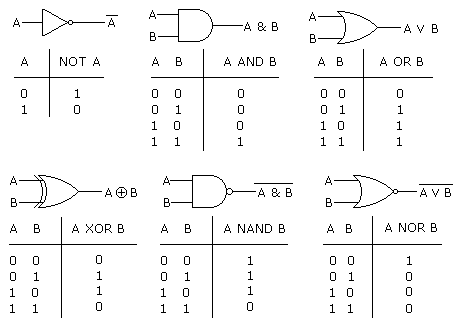
2.1.11 | 11 Define the Boolean operators: AND, OR, NOT, NAND, NOR and XOR.
|
2.1.12 | Construct truth tables using the above operators.
|
2.1.13 | Construct a logic diagram using AND, OR, NOT, NAND, NOR and XOR gates
|
Topic 3: Networks
Objectives: |
3.1 Networks |
Network Fundamentals |
3.1.1 | Identify different types of networks.
|
3.1.2 | Outline the importance of standards in the construction of networks.
|
3.1.3 | Describe how communication over networks is broken down into different layers.
|
3.1.4 | Identify the technologies required to provide a VPN.
|
3.1.5 | Evaluate the use of a VPN.
|
Data Transmission |
3.1.6 | Define the terms: protocol, data packet.
|
3.1.7 | Explain why protocols are necessary.
|
3.1.8 | Explain why the speed of data transmission across a network can vary.
|
3.1.9 | Explain why compression of data is often necessary when transmitting
across a network.
|
3.1.10 | Outline the characteristics of different transmission media.
|
3.1.11 | Explain how data is transmitted by packet switching.
|
Wireless Networking |
3.1.12 | Outline the advantages and disadvantages of wireless networks.
|
3.1.13 | Describe the hardware and software components of a wireless network
|
3.1.14 | Describe the characteristics of wireless networks.
|
3.1.15 | Describe the different methods of network security.
|
3.1.16 | Evaluate the advantages and disadvantages of each method of network security.
|
Topic 4: Computational thinking, problem-solving and programming
Objectives: |
4.1 General Principles |
Thinking Procedureally |
4.1.1 | Identify the procedure appropriate to solving a problem.
|
4.1.2 | Evaluate whether the order in which activities are undertaken will result in the required outcome.
|
4.1.3 | Explain the role of sub-procedures in solving a problem.
|
Thinking Logically |
4.1.4 | Identify when decision-making is required in a specified situation.
|
4.1.5 | Identify the decisions required for the solution to a specified problem.
|
4.1.6 | Identify the condition associated with a given decision in a specified problem.
|
4.1.7 | Explain the relationship between the decisions and conditions of a system.
|
4.1.8 | Deduce logical rules for real-world situations.
|
Thinking Ahead |
4.1.9 | Identify the inputs and outputs required in a solution.
|
4.1.10 | Identify pre-planning in a suggested problem and solution.
|
4.1.11 | Explain the need for pre-conditions when executing an algorithm.
|
4.1.12 | Outline the pre- and post-conditions to a specified problem.
|
4.1.13 | Identify exceptions that need to be considered in a specified problem solution.
|
Thinking Concurrently |
4.1.14 | Identify the parts of a solution that could be implemented concurrently.
|
4.1.15 | Describe how concurrent processing can be used to solve a problem.
|
4.1.16 | Evaluate the decision to use concurrent processing in solving a problem.
|
Thinking Abstractly |
4.1.17 | Identify examples of abstraction.
|
4.1.18 | Explain why abstraction is required in the derivation of computational solutions for a specified situation.
|
4.1.19 | Construct an abstraction from a specified situation.
|
4.1.20 | Distinguish between a real-world entity and its abstraction.
|
4.2 Connecting Computational Thinking and Program Design | 4.2.1 | Describe the characteristics of standard algorithms on linear arrays.
|
4.2.2 | Outline the standard operations of collections.
|
4.2.3 | Discuss an algorithm to solve a specific problem.
|
4.2.4 | Analyse an algorithm presented as a flow chart.
|
4.2.5 | Analyse an algorithm presented as pseudocode.
|
4.2.6 | Construct pseudocode to represent an algorithm.
|
4.2.7 | Suggest suitable algorithms to solve a specific problem.
|
4.2.8 | Deduce the efficiency of an algorithm in the context of its use.
|
4.2.9 | Determine the number of times a step in an algorithm will be performed for given input data.
|
4.3 Introduction to Programming |
Nature of Programming Languages |
4.3.1 | State the fundamental operations of a computer.
|
4.3.2 | Distinguish between fundamental and compound operations of a computer.
|
4.3.3 | Explain the essential features of a computer language.
|
4.3.4 | Explain the need for higher level languages.
|
4.3.5 | Outline the need for a translation process from a higher level language to machine executable code.
|
Use of Programming Languages |
4.3.6 | Define the terms: variable, constant, operator, object.
|
4.3.7 | Define the operators =, ., <, <=, >, >=, mod, div.
|
4.3.8 | Analyse the use of variables, constants and operators in algorithms.
|
4.3.9 | Construct algorithms using loops, branching.
|
4.3.10 | Describe the characteristics and applications of a collection.
|
4.3.11 | Construct algorithms using the access methods of a collection.
|
4.3.12 | Discuss the need for sub-programmes and collections within programmed solutions.
|
4.3.13 | Construct algorithms using predefined sub-programmes, one-dimensional arrays and/or
collections.
|
Topic 5: Abstract data structures
Objectives: |
5.1 Abstract Data Structures |
Thinking Recursively |
5.1.1 | Identify a situation that requires the use of recursive thinking.
|
5.1.2 | Identify recursive thinking in a specified problem solution.
|
5.1.3 | Trace a recursive algorithm to express a solution to a problem.
|
Abstract Data Structures |
5.1.4 | Describe the characteristics of a two-dimensional array.
|
5.1.5 | Describe the characteristics and applications of a stack.
|
5.1.6 | Describe the characteristics and applications of a stack.
|
5.1.7 | Construct algorithms using the access methods of a stack.
|
5.1.8 | Describe the characteristics and applications of a queue.
|
5.1.9 | Construct algorithms using the access methods of a queue.
|
5.1.10 | Explain the use of arrays as static stacks and queues.
|
Linked Lists |
5.1.11 | Describe the features and characteristics of a dynamic data structure.
|
5.1.12 | Describe how linked lists operate logically.
|
5.1.13 | Sketch linked lists (single, double and circular).
|
Trees |
5.1.14 | Describe how trees operate logically (both binary and non-binary).
|
5.1.15 | Define the terms: parent, left-child, right-child, subtree, root and leaf.
|
5.1.16 | State the result of inorder, postorder and preorder tree traversal.
|
5.1.17 | Sketch binary trees.
|
Applications |
5.1.18 | Define the term dynamic data structure.
|
5.1.19 | Compare the use of static and dynamic data structures.
|
5.1.20 | Suggest a suitable structure for a given situation.
|
Topic 6: Resource management
Objectives: |
6.1 Resource Management |
System Resources |
6.1.1 | Identify the resources that need to be managed within a computer system.
|
6.1.2 | Evaluate the resources available in a variety of computer systems.
|
6.1.3 | Identify the limitations of a range of resources in a specified computer system. |
6.1.4 | Describe the possible problems resulting from the limitations in the resources in a computer system.
|
Role of the Operating System |
6.1.5 | Explain the role of the operating system in terms of managing memory, peripherals and hardware interfaces.
|
6.1.6 | [not defined]
|
6.1.7 | Outline OS resource management techniques: scheduling, policies, multitasking, virtual memory, paging, interrupt, polling.
|
6.1.8 | Discuss the advantages of producing a dedicated operating system for a device.
|
6.1.9 | Outline how an operating system hides the complexity of the hardware from users and applications.
|
Topic 7: Control
Objectives: |
7.1 Control |
Centralized Control Systems |
7.1.1 | Discuss a range of control systems.
|
7.1.2 | Outline the uses of microprocessors and sensor input in control systems.
|
7.1.3 | Evaluate different input devices for the collection of data in specified situations.
|
7.1.4 | Explain the relationship between a sensor, the processor and an output transducer.
|
7.1.5 | Describe the role of feedback in a control system.
|
7.1.6 | Discuss the social impacts and ethical considerations associated with the use of embedded systems.
|
Distributed Systems |
7.1.7 | Compare a centrally controlled system with a distributed system.
|
7.1.8 | Outline the role of autonomous agents acting within a larger system.
|
Option A: Databases
Objectives: |
A.1 Basic Concepts |
A.1.1 | Outline the differences between data and information.
|
A.1.2 | Outline the differences between an information system and a database.
|
A.1.3 | Discuss the need for databases.
|
A.1.4 | Describe the use of transactions, states and updates to maintain data consistency (and integrity).
|
A.1.5 | Define the term database transaction.
|
A.1.6 | Explain concurrency in a data sharing situation.
|
A.1.7 | Explain the importance of the ACID properties of a database transaction.
|
A.1.8 | Describe the two functions databases require to be performed on them.
|
A.1.9 | Explain the role of data validation and data verification.
|
A.2 The Relational Database Model |
A.2.1 | Define the terms: database management system (DBMS) and relational database management system (RDBMS).
|
A.2.2 | Outline the functions and tools of a DBMS.
|
A.2.3 | Describe how a DBMS can be used to promote data security.
|
A.2.4 | Define the term schema.
|
A.2.5 | Identify the characteristics of the three levels of the schema: conceptual, logical, physical.
|
A.2.6 | Outline the nature of the data dictionary.
|
A.2.7 | Explain the importance of a data definition language in implementing a data model
|
A.2.8 | Explain the importance of data modelling in the design of a database
|
A.2.9 | Define the following database terms: table, record, field, primary key, secondary key, foreign key, candidate key, composite primary key, join.
|
A.2.10 | Identify the different types of relationships within databases: one-toone, one-to-many, many-to-many.
|
A.2.11 | Outline the issues caused by redundant data.
|
A.2.12 | Outline the importance of referential integrity in a normalized database.
|
A.2.13 | Describe the differences between 1st Normal Form (1NF), 2nd Normal Form
(2NF) and 3rd Normal Form (3NF).
|
A.2.14 | Describe the characteristics of a normalized database.
|
A.2.15 | Evaluate the appropriateness of the different data types.
|
A.2.16 | Construct an entity-relationship diagram (ERD) for a given scenario.
|
A.2.17 | Construct a relational database to 3NF using objects such as tables, queries, forms, reports and macros.
|
A.2.18 | Explain how a query can provide a view of a database.
|
A.2.19 | Describe the difference between a simple and complex query.
|
A.2.20 | Outline the different methods that can be used to construct a query.
|
A.3 Further Aspects of Database Management |
A.3.1 | Explain the role of a database administrator.
|
A.3.2 | Explain how end-users can interact with a database.
|
A.3.3 | Describe different methods of database recovery.
|
A.3.4 | Outline how integrated database systems function.
|
A.3.5 | Outline the use of databases in areas such as stock control, police records, health records, employee data.
|
A.3.6 | Suggest methods to ensure the privacy of the personal data and the responsibility of those holding personal data not to sell or divulge it in any way.
|
A.3.7 | Discuss the need for some databases to be open to interrogation by other parties (police, government, etc).
|
A.3.8 | Explain the difference between data matching and data mining.
|
HL Extension: A.4 Further Database Models and Database Analysis |
A.4.1 | Describe the characteristics of different database models.
|
A.4.2 | Evaluate the use of object-oriented databases as opposed to relational databases.
|
A.4.3 | Define the term data warehouse.
|
A.4.4 | Describe a range of situations suitable for data warehousing.
|
A.4.5 | Explain why data warehousing is time dependent.
|
A.4.6 | Describe how data in a warehouse is updated in real time.
|
A.4.7 | Describe the advantages of using data warehousing.
|
A.4.8 | Explain the need for ETL processes in data warehousing.
|
A.4.9 | Describe how ETL processes can be used to clean up data for a data warehouse.
|
A.4.10 | Compare the different forms of discovering patterns using data mining.
|
A.4.11 | Describe situations that benefit from data mining.
|
A.4.12 | Describe how predictive modelling is used.
|
A.4.13 | Explain the nature of database segmentation.
|
A.4.14 | Explain the nature and purpose of link analysis
|
A.4.15 | Describe the process of deviation detection.
|
Option B: Modeling and simulation
Objectives: |
B.1 The Basic Model |
B.1.1 | Define the term computer modelling.
|
B.1.2 | Identify a system that can be modelled.
|
B.1.3 | Identify the variables required to model a given system.
|
B.1.4 | Describe the limitations of computer (mathematical) models.
|
B.1.5 | Outline sensible grouping for collections of data items, including sample data.
|
B.1.6 | Design test-cases to evaluate a model.
|
B.1.7 | Discuss the effectiveness of a test-case in a specified situation.
|
B.1.8 | Discuss the correctness of a model by comparing generated results with data that were observed in the original problem.
|
B.2 Simulations |
B.2.1 | Define the term simulation.
|
B.2.2 | Explain the difference between a model and a simulation.
|
B.2.3 | Describe rules that process data appropriately and that produce results.
|
B.2.4 | Discuss rules and data representations and organization.
|
B.2.5 | Construct simple models that use different forms of data representation and
organization.
|
B.2.6 | Design test-cases to evaluate a simulation program.
|
B.2.7 | Outline the software and hardware required for a simulation.
|
B.2.8 | Describe changes in rules, formulae and algorithms that would improve the
correspondence between results and observed data.
|
B.2.9 | Construct examples of simulations that involve changes in rules, formulae and
algorithms.
|
B.2.10 | Describe changes in data collection that could improve the model or simulation. |
B.2.11 | Discuss the reliability of a simulation by comparing generated results with data that were observed in the original problem.
|
B.2.12 | Outline the advantages and disadvantages of simulation in a given situation rather than simply observing a real-life situation.
|
B.2.13 | Discuss advantages and disadvantages of using a simulation for making predictions.
|
B.3 Visualization |
B.3.1 | Define the term visualization.
|
B.3.2 | Identify a two-dimensional use of visualization.
|
B.3.3 | Outline the memory needs of 2D visualization
|
B.3.4 | Identify a three-dimensional use of visualization.
|
B.3.5 | Outline the relationship between the images in memory and the 3D visualization.
|
B.3.6 | Discuss the time and memory considerations of 3D animation in a given scenario.
|
HL Extension B.4 Communication Modelling and Simulation |
B.4.1 | Outline the use of genetic algorithms.
|
B.4.2 | Outline the structure of neural networks.
|
B.4.3 | Compare applications that use neural network modelling.
|
B.4.4 | Compare different ways in which neural networks can be used to recognize patterns.
|
B.4.5 | Identify the key structures of natural language.
|
B.4.6 | Discuss the differences between human and machine learning when related to language.
|
B.4.7 | Outline the evolution of modern machine translators.
|
B.4.8 | Describe the role of chatbots to simulate conversation.
|
B.4.9 | Discuss the latest advances in natural language processing.
|
Option C: Web science
Objectives: |
C.1 Creating the Web |
C.1.1 | Distinguish between the internet and World Wide Web (web).
|
C.1.2 | Describe how the web is constantly evolving.
|
C.1.3 | Identify the characteristics of the following:
- hypertext transfer protocol (HTTP)
- hypertext transfer protocol secure (HTTPS)
- hypertext mark-up language (HTML)
- uniform resource locator (URL)
- extensible mark-up language (XML)
- extensible stylesheet language transformations (XSLT)
- JavaScript.
- cascading style sheet (CSS).
|
C.1.4 | Identify the characteristics of the following:
- uniform resource identifier (URI)
- URL.
|
C.1.5 | Describe the purpose of a URL.
|
C.1.6 | Describe how a domain name server functions.
|
C.1.7 | Identify the characteristics of:
- internet protocol (IP)
- transmission control protocol (TCP)
- file transfer protocol (FTP).
|
C.1.8 | Outline the different components of a web page.
|
C.1.9 | Explain the importance of protocols and standards on the web.
|
C.1.10 | Describe the different types of web page.
|
C.1.11 | Explain the differences between a static web page and a dynamic web page.
|
C.1.12 | Explain the functions of a browser.
|
C.1.13 | Evaluate the use of client-side scripting and server-side scripting in web pages.
|
C.1.14 | Describe how web pages can be connected to underlying data sources.
|
C.1.15 | Describe the function of the common gateway interface (CGI).
|
C.1.16 | Evaluate the structure of different types of web pages.
|
C.2 Searching the Web |
C.2.1 | Define the term search engine.
|
C.2.2 | Distinguish between the surface web and the deep web.
|
C.2.3 | Outline the principles of searching algorithms used by search engines.
|
C.2.4 | Describe how a web crawler functions.
|
C.2.5 | Discuss the relationship between data in a meta-tag and how it is accessed by a web crawler.
|
C.2.6 | Discuss the use of parallel web crawling.
|
C.2.7 | Outline the purpose of web-indexing in search engines.
|
C.2.8 | Suggest how web developers can create pages that appear more prominently in search engine results.
|
C.2.9 | Describe the different metrics used by search engines.
|
C.2.10 | Explain why the effectiveness of a search engine is determined by the assumptions made when developing it.
|
C.2.11 | Discuss the use of white hat and black hat search engine optimization.
|
C.2.12 | Outline future challenges to search engines as the web continues to grow.
|
C.3 Distributed Approaches to the Web |
C.3.1 | Define the terms: mobile computing, ubiquitous computing, peer-2-peer network, grid computing.
|
C.3.2 | Compare the major features of:
- mobile computing
- ubiquitous computing
- peer-2-peer network
- grid computing.
|
C.3.3 | Distinguish between interoperability and open standards.
|
C.3.4 | 4 Describe the range of hardware used by distributed networks.
|
C.3.5 | 5 Explain why distributed systems may act as a catalyst to a greater decentralization of the web.
|
C.3.6 | Distinguish between lossless and lossy compression.
|
C.3.7 | Evaluate the use of decompression software in the transfer of information.
|
C.4 The Evolving Web |
C.4.1 | Discuss how the web has supported new methods of online interaction such as social networking.
|
C.4.2 | Describe how cloud computing is different from a client-server architecture.
|
C.4.3 | Discuss the effects of the use of cloud computing for specified organizations.
|
C.4.4 | Discuss the management of issues such as copyright and intellectual property on the web.
|
C.4.5 | Describe the interrelationship between privacy, identification and authentication.
|
C.4.6 | Describe the role of network architecture, protocols and standards in the future development of the web.
|
C.4.7 | Explain why the web may be creating unregulated monopolies.
|
C.4.8 | Discuss the effects of a decentralized and democratic web.
|
HL Extension C.5 Analysing the Web |
C.5.1 | Describe how the web can be represented as a directed graph.
|
C.5.2 | Outline the difference between the web graph and sub-graphs.
|
C.5.3 | Describe the main features of the web graph such as bowtie structure, strongly connected core (SCC), diameter.
|
C.5.4 | Explain the role of graph theory in determining the connectivity of the web.
|
C.5.5 | Explain that search engines and web crawling use the web graph to access information.
|
C.5.6 | Discuss whether power laws are appropriate to predict the development of the web.
|
HL Extension C.6 The Intellegent Web |
C.6.1 | Define the term semantic web.
|
C.6.2 | Distinguish between the text-web and the multimedia-web.
|
C.6.3 | Describe the aims of the semantic web.
|
C.6.4 | Distinguish between an ontology and folksonomy.
|
C.6.5 | Describe how folksonomies and emergent social structures are changing the web.
|
C.6.6 | Explain why there needs to be a balance between expressivity and usability on the semantic web.
|
C.6.7 | Evaluate methods of searching for information on the web.
|
C.6.8 | Distinguish between ambient intelligence and collective intelligence.
|
C.6.9 | Discuss how ambient intelligence can be used to support people.
|
C.6.10 | Explain how collective intelligence can be applied to complex issues.
|
Option D: Object-oriented programming
Objectives: |
D.1 Objects as a Programming Concept |
D.1.1 | Outline the general nature of an object.
|
D.1.2 | Distinguish between an object (definition, template or class) and instantiation.
|
D.1.3 | Construct unified modelling language (UML) diagrams to represent object designs.
|
D.1.4 | Interpret UML diagrams.
|
D.1.5 | Describe the process of decomposition into several related objects.
|
D.1.6 | Describe the relationships between objects for a given problem.
|
D.1.7 | Outline the need to reduce dependencies between objects in a given problem.
|
D.1.8 | Construct related objects for a given problem.
|
D.1.9 | Explain the need for different data types to represent data items.
|
D.1.10 | Describe how data items can be passed to and from actions as parameters.
|
D.2 Features of OOP |
D.2.1 | Define the term encapsulation.
|
D.2.2 | Define the term inheritance.
|
D.2.3 | Define the term polymorphism.
|
D.2.4 | Explain the advantages of encapsulation.
|
D.2.5 | Explain the advantages of inheritance.
|
D.2.6 | Explain the advantages of polymorphism.
|
D.2.7 | Describe the advantages of libraries of objects.
|
D.2.8 | Describe the disadvantages of OOP.
|
D.2.9 | Discuss the use of programming teams.
|
D.2.10 | Explain the advantages of modularity in program development
|
D.3 Program Development |
D.3.1 | Define the terms: class, identifier, primitive, instance variable, parameter
variable, local variable.
|
D.3.2 | Define the terms: method, accessor, mutator, constructor, signature, return value.
|
D.3.3 | Define the terms: private, protected, public, extends, static.
|
D.3.4 | Describe the uses of the primitive data types and the reference class string.
|
D.3.5 | Construct code to implement assessment statements D.3.1–D.3.4.
|
D.3.6 | Construct code examples related to selection statements.
|
D.3.7 | Construct code examples related to repetition statements.
|
D.3.8 | Construct code examples related to static arrays.
|
D.3.9 | Discuss the features of modern programming languages that enable internationalization.
|
D.3.10 | Discuss the ethical and moral obligations of programmers.
|
HL Extension D.4 Advanced Program Development |
D.4.1 | Define the term recursion.
|
D.4.2 | Describe the application of recursive algorithms.
|
D.4.3 | Construct algorithms that use recursion.
|
D.4.4 | Trace recursive algorithms.
|
D.4.5 | Define the term object reference.
|
D.4.6 | Construct algorithms that use reference mechanisms.
|
D.4.7 | Identify the features of the abstract data type (ADT) list.
|
D.4.8 | Describe applications of lists. 2 Students should understand that lists can be used to represent stacks and queues.
|
D.4.9 | Construct algorithms using a static implementation of a list.
|
D.4.10 | Construct list algorithms using object references.
|
D.4.11 | Construct algorithms using the standard library collections included in JETS.
|
D.4.12 | Trace algorithms using the implementations described in assessment statements D.4.9-D.4.11.
|
D.4.13 | Explain the advantages of using library collections.
|
D.4.14 | Outline the features of ADT’s stack, queue and binary tree.
|
D.4.15 | Explain the importance of style and naming conventions in code.
|
| Content Covered |
Text Book | Starting Out with C++ Early Objects:
- Chapter 1, “Introduction to Computers and Programming”
- Chapter 2, “ Introduction to C++”
- Appendix K, “Introduction to Microsoft Visual C++ 2005”
|
ITT Tech
Virtual Libary |
See course syllabus
|
Summary and Reminders |
Summary
- To create a project in Visual C++ 2005, you need to add a .cpp file to the Source Files folder.
- A C++ program’s entry point is a function named main.
- C++ is a case-sensitive programming language.
- The #include preprocessor directive is used to include libraries.
- The assignment operator is used to assign a value to a variable.
- C++ supports standard arithmetic operators, including +, -, /, %, and *.
- You can use // to create a single-line comment. You can use /* */ to create single-line or multiple line comments.
- cout references an outstream that is used to send output to the screen
- A variable is declared by specifying a data type and variable identifier.
Reminders
- Project Part 1 is due at the beginning of the next class.
- Assignment Topic-1 is due at the beginning of the next class.
|
| Student Handouts/Resources |
|
|
|